Introduction
Cloud spending keeps climbing. Global cloud infrastructure spending reached $102.6 billion in Q3 2025, representing 25% year-on-year growth. Yet many organizations waste substantial portions of their AWS budget on resources that sit idle or run at a fraction of their capacity. Research shows 32% of cloud budgets are wasted, mostly due to overprovisioned or idle resources. The real challenge isn't just cutting costs but building sustainable optimization that maintains performance while controlling spend.
This guide reveals proven strategies that engineering teams use to dramatically reduce AWS spending without sacrificing reliability.
Key Highlights: What You'll Learn
Smart teams treat AWS cost optimization differently. Here's what this guide delivers:
Organizations waste 32% of cloud budgets on overprovisioned or idle resources
Standard Reserved Instances provide up to 72% savings for predictable workloads
Spot Instances cut costs up to 90% for fault-tolerant applications
Gateway VPC endpoints for S3 and DynamoDB eliminate NAT Gateway charges entirely
Continuous monitoring catches waste within 24 hours, not during monthly billing reviews
Cost allocation through tagging creates accountability across engineering teams
The teams seeing the biggest impact share one trait: they view optimization as ongoing engineering work, not quarterly cost-cutting exercises.
Understanding AWS Cost Optimization Beyond Simple Cost-Cutting
AWS optimization refers to the ongoing process of matching cloud resources to application needs, ensuring every dollar spent produces business value without sacrificing performance or availability.
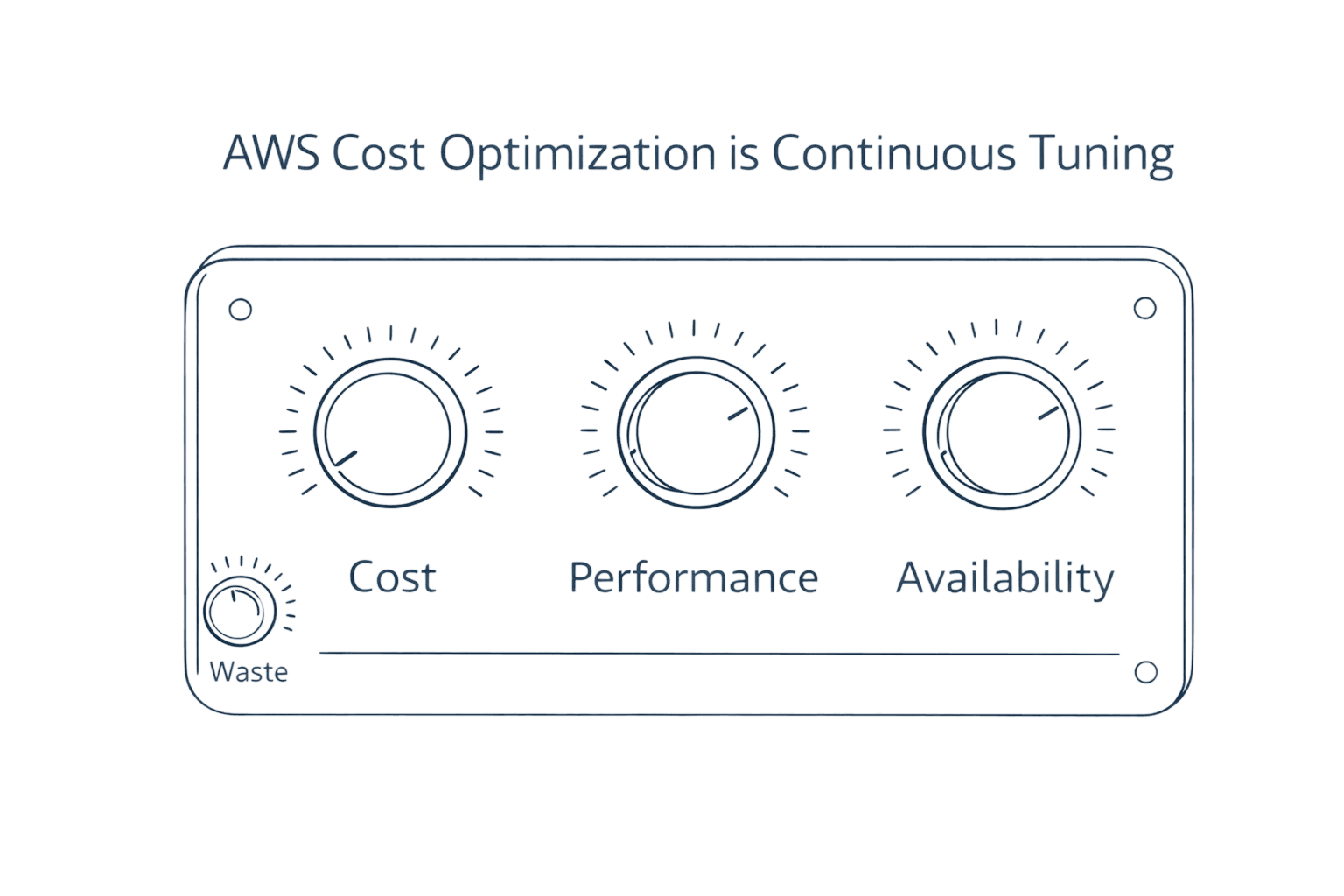
This differs fundamentally from cost reduction. Cutting your AWS bill by shutting down production databases saves money but destroys value. Real optimization balances three competing demands.
Cost efficiency eliminates waste from idle resources and overprovisioned instances. Research indicates 66% of organizations report wasted spend due to idle or underused resources. Performance ensures you select appropriate instance types with sufficient capacity for workload spikes. Availability maintains SLAs through redundancy and failover strategies.
Teams that optimize only for cost inevitably face performance issues. Teams that ignore cost optimization watch budgets spiral. The sweet spot requires continuous balancing of all three pillars.
The Three Pillars of AWS Cost Optimization
Cost Efficiency Through Waste Elimination
Most AWS waste comes from predictable sources. Development teams spin up instances for testing and forget to shut them down. Engineers overprovision resources to avoid capacity risks. Storage accumulates in cheaper tiers that nobody reviews. Each source requires different detection and cleanup strategies.
Performance Optimization Through Right-Sizing
Selecting appropriate instance families matters more than most teams realize. A compute-optimized C6i instance runs data processing workloads faster at lower cost than a general-purpose M5 instance. Memory-optimized R6g instances powered by AWS Graviton processors deliver better performance per dollar for in-memory databases.
Availability Through Reliable Architecture
Multi-AZ deployments cost more but prevent outages that cost even more. Auto-scaling policies ensure capacity during traffic spikes. Reserved capacity guarantees resources when you need them. Smart architecture balances these costs against business risk.
Rightsizing: Matching Resources to Actual Workload Demands
Rightsizing addresses the most common source of AWS waste. Teams provision instances for peak capacity that occurs 1% of the time, then run those oversized resources 24/7. The math doesn't work.
AWS Compute Optimizer analyzes CloudWatch metrics to identify overprovisioned resources. It examines CPU utilization, memory consumption, network throughput, and disk I/O across 14-day windows. When an m5.2xlarge instance consistently uses 15% CPU and 30% memory, you're paying for capacity you don't need.
The optimization process follows three steps. First, identify candidates using Compute Optimizer recommendations. Second, test rightsizing in non-production environments to verify performance remains acceptable. Third, implement changes gradually during maintenance windows to minimize risk.
Rightsizing Comparison by Workload Type
Workload Type | Typical Overprovisioning | Recommended Approach | Expected Savings |
Web Applications | 40-60% oversized | Start with 25% reduction | 30-40% |
Batch Processing | 50-70% oversized | Spot + rightsizing | 60-75% |
Databases | 30-50% oversized | Monitor IOPS carefully | 25-35% |
Development/Test | 70-80% oversized | Scheduled shutdown + downsize | 70-80% |
Leveraging Intelligent Pricing Models
AWS offers pricing models that dramatically reduce costs compared to on-demand rates. Reserved Instances offer up to 75% savings over On-Demand pricing for predictable workloads with 1- or 3-year commitments. The challenge lies in choosing the right commitment level.
Reserved Instances work best for steady-state workloads that won't change instance families. Database servers running around the clock represent perfect candidates. AWS provides discounts of up to 72% compared to on-demand instance pricing when you commit to specific instance types in specific regions for one or three years.
Savings Plans provide flexibility across instance families, regions, and even services like Lambda and Fargate. Compute Savings Plans offer up to 66% discounts while allowing you to adjust instance types as your architecture evolves. Start with compute savings plans that adapt as your needs change.
Spot Instances deliver the deepest discounts for fault-tolerant workloads. Spot Instances can reduce compute costs by up to 90% compared to on-demand pricing. Batch processing, data analysis, and containerized applications tolerate the occasional interruption. Mix spot capacity with on-demand instances through spot fleets to balance cost and reliability.
The winning strategy combines all three. Reserve capacity for your baseline load, use savings plans for variable workloads, and leverage spot instances for burst capacity.
Implementing Dynamic Resource Allocation with Auto-Scaling
Auto-scaling eliminates the practice of running peak capacity around the clock. Configure policies that add capacity when CPU exceeds 70% for five minutes, then remove capacity when utilization drops below 40% for ten minutes.
Target tracking policies work better than step scaling for most workloads. Set a target CPU utilization of 70%, and AWS automatically adds or removes instances to maintain that target. The system handles traffic patterns without manual intervention.
Scheduled scaling handles predictable traffic. E-commerce sites see traffic spike at lunch and after work. Configure scaling schedules that add capacity before peak hours and reduce it afterward. The instances cost money only when you need them.
Eliminating Idle and Orphaned Resources
Idle resources represent the easiest optimization wins. They accumulate silently as engineers spin up resources for testing, then move to other projects. Nobody remembers to clean up.
Common sources of waste:
Unattached EBS volumes left behind after instance termination
Elastic IPs not associated with running instances (AWS charges for these)
Idle RDS databases with zero connections for 7+ days
Load balancers serving no traffic
Orphaned snapshots from deleted volumes
AWS Trusted Advisor identifies these resources, but automation catches them faster. Create Lambda functions triggered by CloudWatch Events that tag idle resources, notify owners, and delete resources unclaimed after 30 days.
Optimizing Data Transfer and Network Costs
Network costs hide in plain sight until they become problems. Cross-region data transfer and unnecessary public egress quietly inflate bills.
High-cost patterns to avoid:
Cross-AZ traffic between microservices adds up fast when services communicate frequently. Deploy related services in the same availability zone when your architecture allows. Use VPC peering for private connectivity instead of routing through internet gateways.
Data egress to the internet starts at $0.09 per GB for the first 10 TB monthly (after the first 100 GB free tier). CloudFront CDN reduces this by caching content at edge locations. S3 Transfer Acceleration speeds up uploads while reducing transfer costs through optimized routing.
NAT gateways charge for both data processing ($0.045/GB) and hourly usage ($0.045/hour in most US regions). A single NAT gateway costs approximately $32.40 monthly just for being provisioned, before any data processing fees. VPC endpoints for S3 and DynamoDB bypass NAT gateways entirely, eliminating both charges since gateway-type VPC endpoints have no hourly or data processing fees.
Storage Optimization: S3 Intelligent-Tiering and Lifecycle Policies
Storage costs accumulate through poor tier selection. S3 Intelligent-Tiering automatically moves data between tiers based on access patterns, reducing storage costs without manual intervention.
Lifecycle policies automate tier transitions. Move logs to Infrequent Access after 30 days, then to Glacier after 90 days. Delete test data automatically after 180 days. Set the policy once and let AWS handle the rest.
EBS snapshot management prevents another common waste source. Old snapshots accumulate quickly when automation creates daily backups. Implement lifecycle policies that retain 7 daily, 4 weekly, and 12 monthly snapshots, then delete older copies.
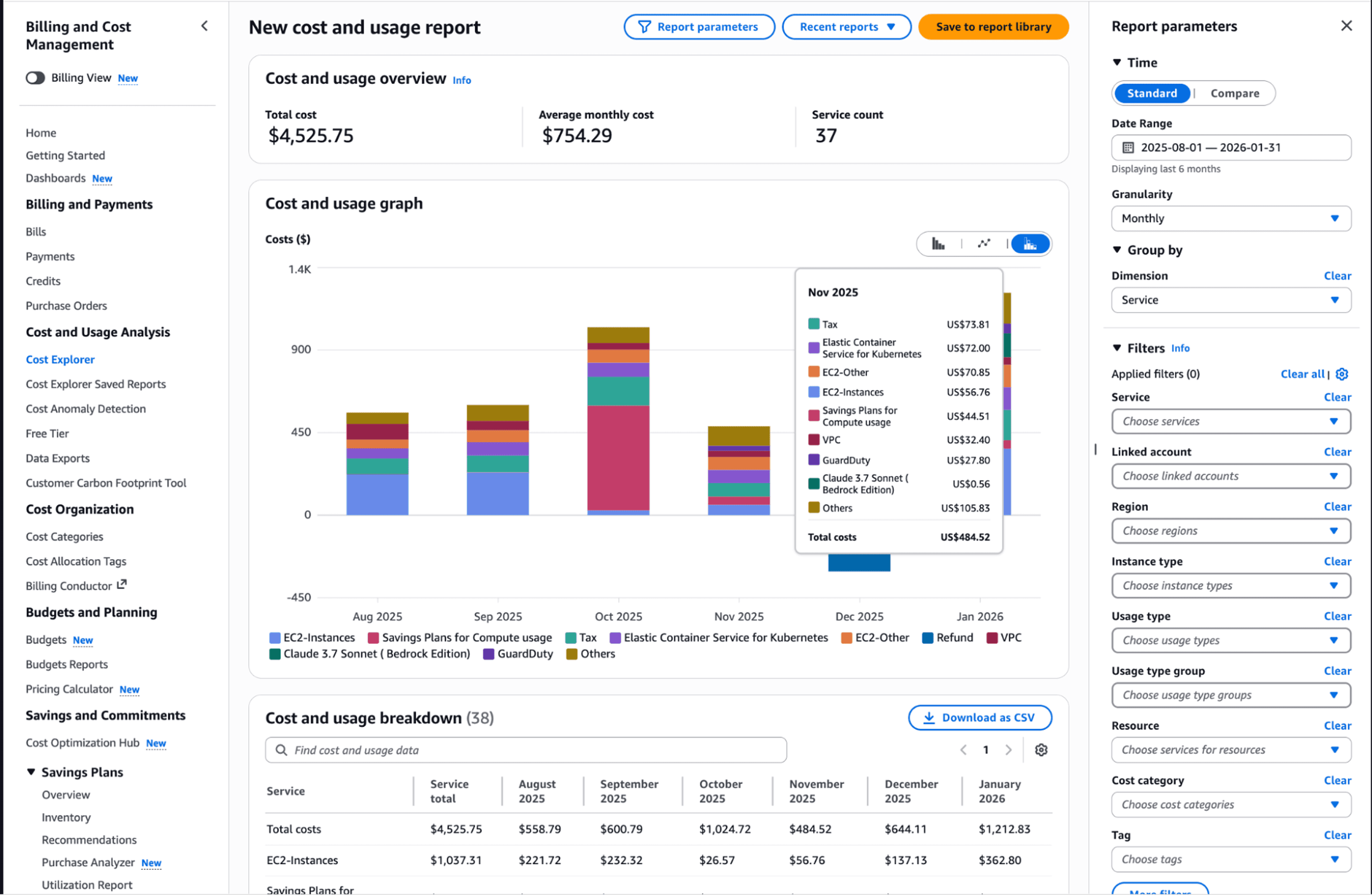
Establishing Visibility with Cost Allocation Tags and AWS Cost Explorer
Cost allocation tags categorize and track AWS usage and costs. When you apply tags to AWS resources, AWS generates cost and usage reports with your usage and your tags.
Effective tagging strategies require four mandatory tags: Environment (production, development, staging), Team (engineering, data-science, marketing), Project (mobile-app, website-redesign), and CostCenter (accounting allocation code).
Enforce tagging through AWS Organizations Service Control Policies. Prevent resource creation without required tags. AWS Config rules identify untagged resources and alert owners to fix compliance violations.
AWS Cost Explorer transforms tagged data into actionable insights. Cost Explorer automatically pulls detailed usage and cost data and presents it through simple graphs and charts. Filter spending by any tag to identify which teams or projects drive costs. Forecast next month's spending based on current trends.
Native AWS Tools vs. Third-Party Solutions
AWS provides robust native tools. Cost Optimization Hub centralizes cost optimization recommendations across multiple AWS services, providing a single dashboard for tracking and implementing cost-saving opportunities.
AWS recently introduced the Cost efficiency metric, which combines resource optimization and commitment optimization into a single score. The formula is simple: Cost efficiency = [1 - (Potential Savings / Total Optimizable Spend)] × 100%.
Native tools excel for single-account environments with straightforward architectures. Organizations managing dozens of accounts across multiple teams need more sophisticated platforms that provide automated remediation, predictive analytics, and cross-cloud visibility.
When to supplement native tools:
Managing 10+ AWS accounts requires consolidated reporting
Development teams need self-service cost allocation without accessing billing data
Automated remediation is essential for scaling optimization efforts
Multi-cloud environments demand unified cost management
Common Mistakes That Undermine Optimization
Teams repeat predictable mistakes that negate optimization efforts.
Treating optimization as a quarterly event instead of continuous practice means waste accumulates between cleanup sessions. Implement automated monitoring with daily anomaly detection.
Over-provisioning to avoid capacity risks costs more than occasional performance issues. Use auto-scaling to handle spikes rather than running peak capacity constantly.
Neglecting data transfer costs until they become problems. Architect applications to minimize cross-region and cross-AZ traffic from the start.
Lacking clear ownership across teams means nobody takes responsibility for costs. Assign cost accountability to engineering teams through chargeback models.
Building a FinOps Culture
Sustainable optimization requires organizational transformation. Finance, engineering, and operations must collaborate continuously rather than operating in silos.
Cloud Financial Management practices establish frameworks where engineering teams make cost-aware decisions during development, not after deployment. Unit economics like cost per transaction or cost per user align spending with business value.
Implement spending controls with clear ownership. Each team receives a budget and visibility into their consumption. Monthly reviews identify trends and optimization opportunities. The goal isn't minimizing costs but maximizing value delivered per dollar spent.
Opsolute: Unified Cloud Cost Visibility and Optimization
Implementing these strategies delivers results, but sustaining gains requires comprehensive visibility and continuous monitoring. Opsolute provides a unified FinOps platform designed for organizations serious about cloud cost management.
The platform delivers real-time cost tracking across AWS and GCP with unified dashboards showing monthly spend tracking, department-wise cost distribution, and top spending contributors. You see exactly where money flows without manual report generation.
Intelligent cost optimization identifies savings opportunities automatically. The system detects idle resources based on CPU usage, network activity, and disk patterns, then provides rightsizing recommendations with confidence scoring. You know which actions deliver the biggest impact.
Forecasting capabilities use predictive analytics for next-month spend projections with budget comparison and variance tracking. You catch potential overruns before they hit your account.
Budget guardrails enforce spending controls with configurable alerts and real-time enforcement. Set thresholds by account, environment, or team, then receive proactive warnings when utilization approaches limits.
Chargeback and showback capabilities provide hierarchical cost attribution that enables team-level tracking with budget allocation. Finance and engineering teams work from the same data, eliminating disputes over who spent what.
Opsolute helps teams move from reactive cost management to proactive optimization through centralized visibility, automated recommendations, and seamless collaboration between finance and engineering.
Take Action Now
AWS cost optimization delivers measurable results when implemented systematically. Start with these immediate actions:
This week: Enable AWS Cost Explorer and review your top 10 spending services. Identify obvious waste like unattached volumes and idle instances.
This month: Implement cost allocation tags across all resources. Set up budget alerts at 80% and 100% thresholds. Create rightsizing plan for your largest workloads.
This quarter: Analyze compute patterns for Reserved Instance and Savings Plan opportunities. Establish automated cleanup for idle resources. Deploy auto-scaling for variable workloads.
The teams winning at cloud cost optimization don't have secret knowledge. They treat optimization as continuous engineering discipline, implement automation that sustains gains, and create visibility that drives accountability.