Introduction
Managing a dozen AWS accounts feels manageable. Managing hundreds creates chaos, unless you have the right framework. AWS Organizations transforms fragmented account sprawl into centralized governance, delivering security controls that span your entire cloud infrastructure while consolidating costs under a single billing view.
What Makes AWS Organizations Essential for Enterprise Cloud
AWS Organizations is a management service that consolidates multiple AWS accounts under centralized control. Instead of managing each account separately with its own billing like AWS Savings Plans, security policies, and access controls, you create a hierarchical structure where policies cascade down from a management account through organizational units to member accounts.
The service addresses the fundamental challenge enterprises face: how do you maintain strong security boundaries between workloads while enforcing consistent governance across all accounts? Teams need isolation for compliance, cost tracking, and blast radius limitation. But isolation without coordination creates security gaps, cost inefficiencies, and operational complexity.
Organizations solves this by treating your AWS environment as a unified entity. You define policies once and apply them across dozens or thousands of accounts. You get one consolidated bill showing all charges. Security services like CloudTrail and GuardDuty operate organization-wide, eliminating blind spots. Most critically, Service Control Policies and Resource Control Policies create permission boundaries that prevent unauthorized actions even if someone has admin credentials.
Key capabilities at a glance:
Hierarchical account structure using organizational units that mirror business functions
Service Control Policies restricting principal permissions across accounts regardless of IAM settings
Resource Control Policies establishing data perimeters by restricting what can access your resources
Consolidated billing aggregating charges across all member accounts with volume discounts
Automated account creation through APIs or AWS Control Tower using AWS Tags
Centralized root access management eliminating the need to maintain credentials for member accounts
Building Your Account Architecture with Organizational Units
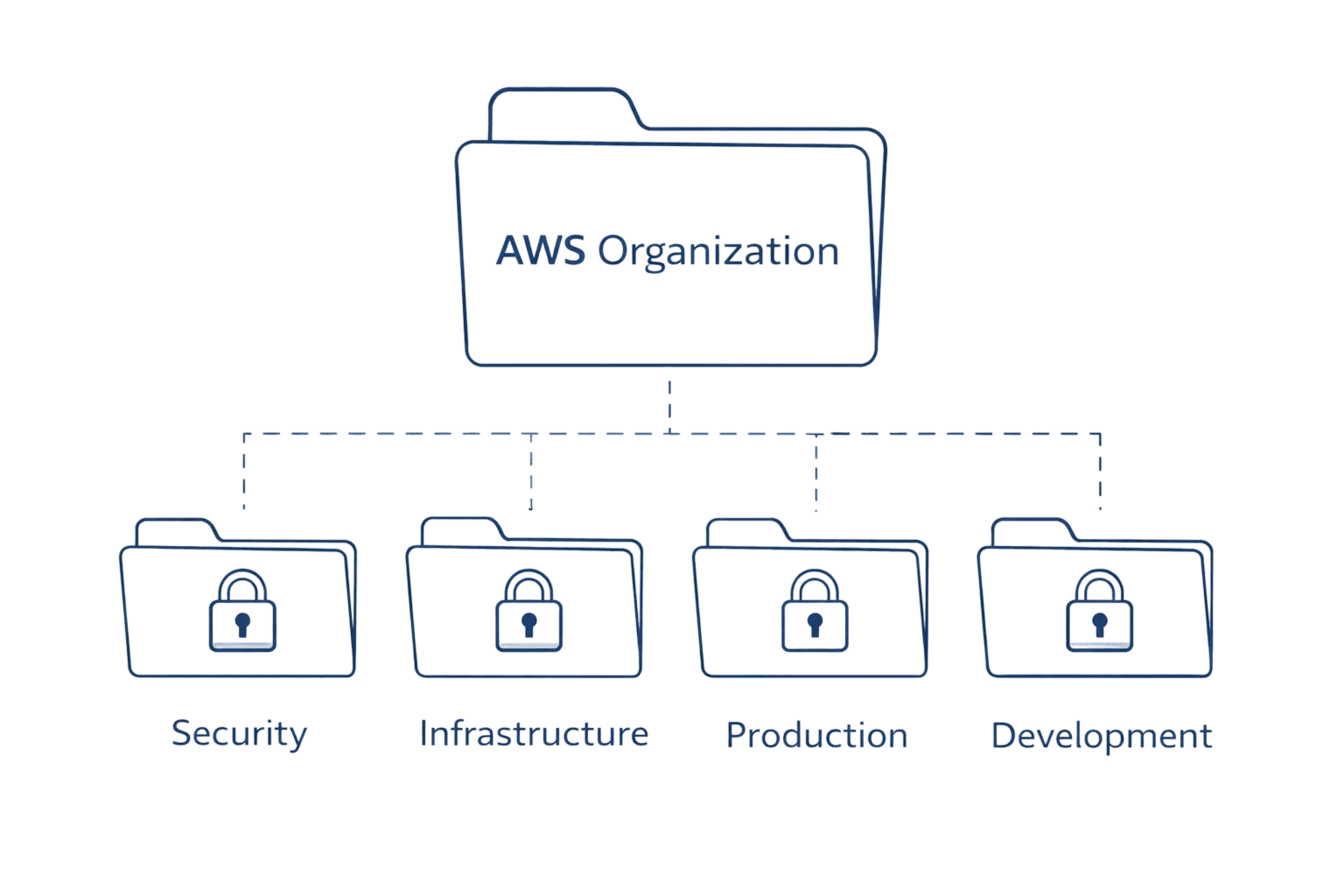
Organizational units create logical groupings within your organization. Think of them as folders containing accounts that share common characteristics, whether that's the workload environment (production vs. development), business function (finance vs. engineering), or compliance boundary (PCI-DSS vs. standard).
The typical enterprise structure starts with foundational OUs housing critical accounts that serve the entire organization. A Security OU contains accounts for centralized logging, security tooling, and audit trails. An Infrastructure OU holds shared services like networking, DNS, and identity management. These foundational accounts rarely change and require strict access controls.
Next comes workload segregation. Many organizations create separate OUs for production and non-production environments. Production accounts run customer-facing applications with stringent change controls. Development accounts allow engineers to experiment freely using AWS Cost Management approach without impacting production stability. This separation isn't just operational, it enables different security policies: production might restrict all unencrypted S3 buckets while development allows them for testing.
OU Type | Purpose | Typical Accounts | Policy Focus |
Security | Centralized security operations | Log Archive, Security Tooling, Audit | Read-only access, immutable logs |
Infrastructure | Shared platform services | Networking, DNS, Directory Services | Restricted modifications, central management |
Production | Customer-facing workloads | Application accounts by product/team | Strict change controls, encryption required |
Development | Innovation and testing | Dev/test accounts by team | Relaxed constraints, cost controls |
Sandbox | Experimentation | Short-lived test accounts | Temporary, automatically decommissioned |
Some enterprises add Deployment OUs for CI/CD pipelines, ensuring build systems operate in controlled environments separate from application accounts. Others create Suspended OUs
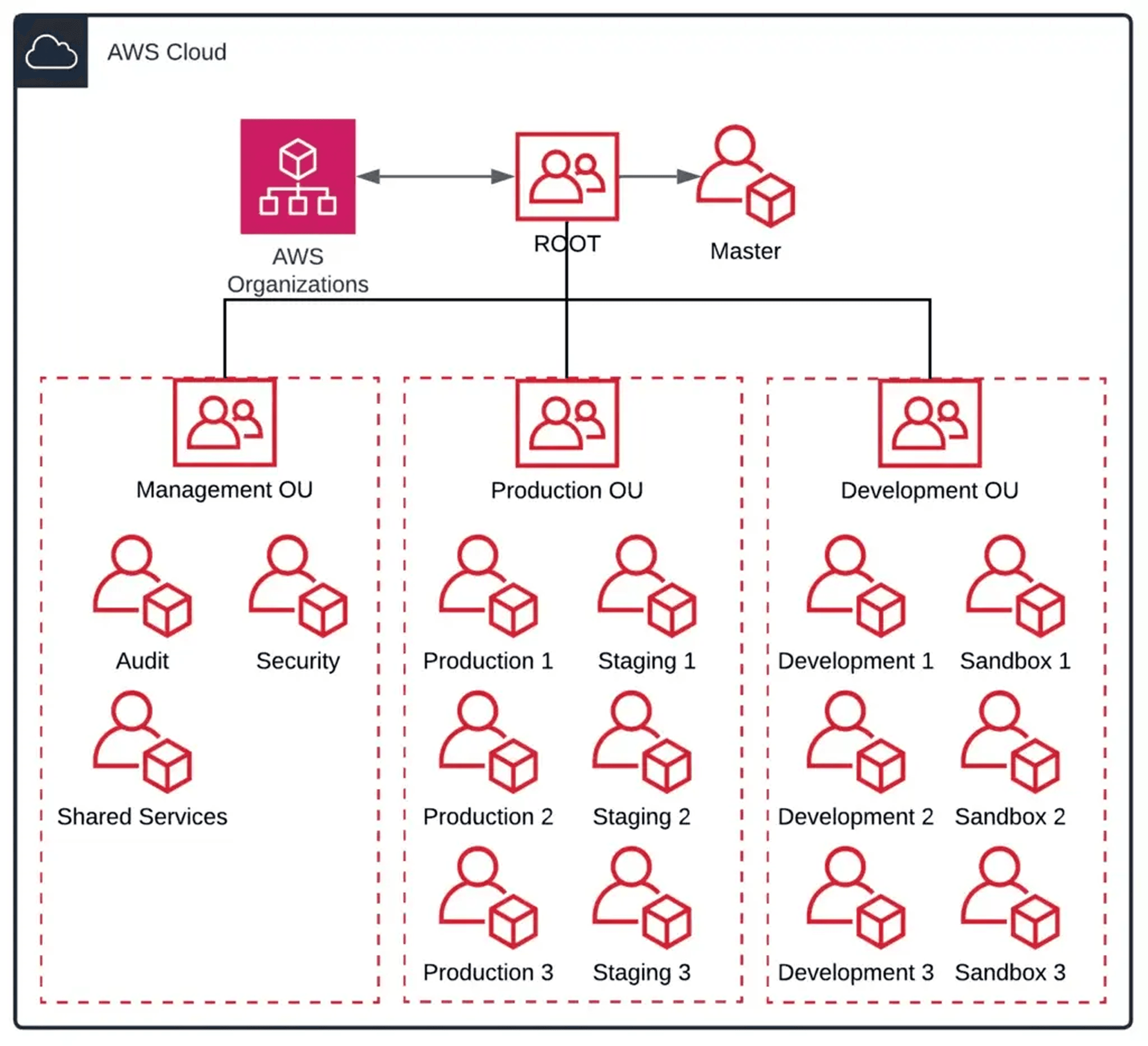
holding accounts being decommissioned but not yet deleted, preventing accidental reactivation while maintaining audit trails.
The key principle: apply policies at OU level rather than individual accounts. When you attach policies to an OU, they automatically apply to all accounts within that OU and any nested OUs beneath it. This dramatically simplifies policy management compared to configuring each account separately.
Start with a shallow structure. AWS supports five levels of OU nesting, but most organizations need only two or three levels. Deep hierarchies become difficult to understand and troubleshoot. Add new OUs only when there's clear value, whether that's applying different policies to account groups or improving organizational visibility.
How Service Control Policies and Resource Control Policies Create Your Data Perimeter
AWS Organizations uses two complementary policy types to establish what AWS officially calls the "data perimeter" framework. Together, SCPs and RCPs ensure that only trusted identities access trusted resources from expected networks.
Service Control Policies set the maximum permissions available to principals (IAM users and roles) within your organization. Unlike IAM policies that grant permissions, SCPs restrict them. They act as permission guardrails, defining what's possible regardless of what IAM policies allow. If an IAM policy allows EC2 instance termination but an SCP denies it, the action fails. The effective permission is the logical intersection of all policies.
Resource Control Policies, introduced in late 2024, represent the resource-centric counterpart to SCPs. While SCPs restrict who can do what (principal-centric), RCPs restrict what can be done to your resources (resource-centric). RCPs apply to all requests reaching your resources, regardless of whether principals belong to your organization or not. This makes them critical for preventing data exfiltration to external accounts.
The distinction matters: SCPs protect against your own principals accessing untrusted resources. RCPs protect against untrusted principals (including those outside your organization) accessing your resources. You need both for comprehensive defense-in-depth.
SCPs use standard IAM policy language with Allow and Deny statements. Since September 2025, SCPs support the full IAM policy language including conditions, individual resource ARNs, the NotAction element with Allow statements, and wildcards at the beginning or middle of Action strings. This enhancement makes "allow-list" strategies (explicitly allowing only specific services) significantly easier to write and maintain than the old deny-list heavy approach.
{ |
This SCP blocks all actions outside US East and US West regions. No user can launch resources in other regions regardless of their IAM permissions. The regional restriction happens organization-wide or OU-wide depending where you attach the policy.
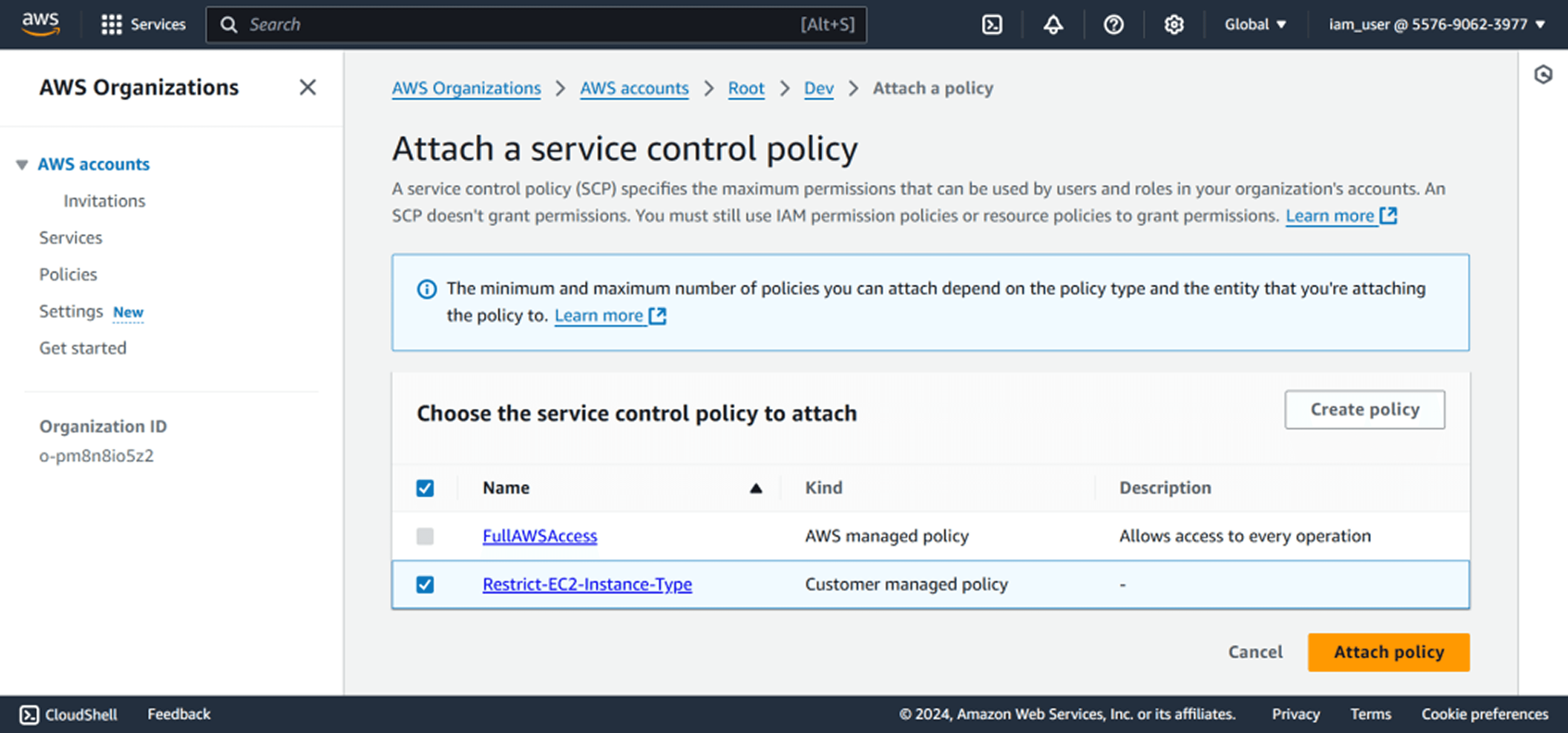
RCPs follow similar syntax but focus on resource access. A common RCP pattern prevents S3 buckets in your organization from being accessed by principals outside your organization, regardless of what bucket policies might allow. Even if a developer adds a bucket policy granting public access, the RCP blocks external principals from actually reaching that data.
Critical limitations: SCPs don't apply to the management account itself. RCPs also don't apply to the management account or service-linked roles. This is intentional, preventing you from locking yourself out of your organization. But it means you must treat the management account carefully, never running production workloads there and limiting human access to absolute minimum.
The data perimeter framework uses SCPs and RCPs to enforce three objectives: trusted identities (only your principals or AWS services), trusted resources (only resources in your organization), and expected networks (only your VPCs or approved IP ranges). This comprehensive approach prevents both intentional and accidental data transfers outside your security boundaries.
Maximizing Cost Efficiency Through Consolidated Billing
Every organization enabled for all features includes consolidated billing by default. Instead of separate invoices for each account, you receive one bill showing all charges across every member account. This simplifies payment processing but delivers far more value through volume pricing aggregation.
AWS pricing often includes volume tiers: the more you use, the lower your per-unit cost. Without Organizations, each account calculates volume independently. An organization with 50 accounts each storing 100TB in S3 pays higher per-GB rates than necessary. Consolidated billing aggregates that usage (5,000TB total), qualifying for dramatically lower pricing tiers. The savings compound across services: data transfer, Lambda invocations, DynamoDB reads, and dozens of other volume-priced services.
Reserved Instances and Savings Plans share across the organization automatically. Purchase EC2 Reserved Instances in one account and the discount applies to matching instance usage anywhere in the organization. This flexibility eliminates the need to predict which accounts will run which workloads, simplifying commitment-based discount strategies.
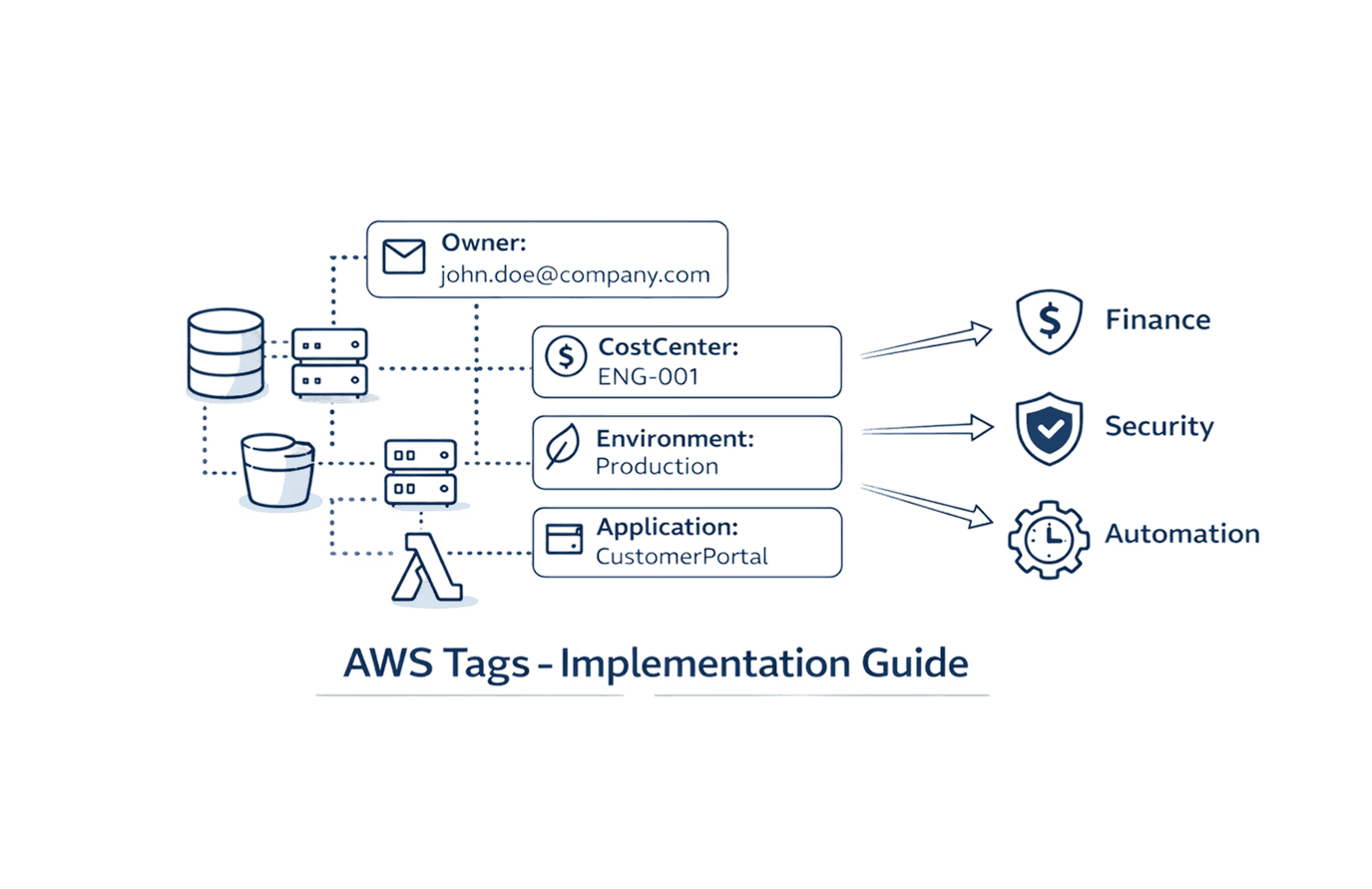
Tag policies enforce cost allocation standards across accounts. Define required tags like CostCenter, Project, or Environment, then attach policies requiring these tags on resources. When engineers launch instances without proper tags, the creation fails. This discipline enables accurate cost attribution: finance can see exactly what each business unit spends without manual reconciliation.
AWS Cost Explorer operates at organization level, showing spending trends across all accounts simultaneously. You can analyze costs by account, service, region, or any tag dimension. Cost anomaly detection monitors the entire organization, identifying unexpected spending spikes across accounts and alerting you within 24 hours instead of discovering surprises at month-end.
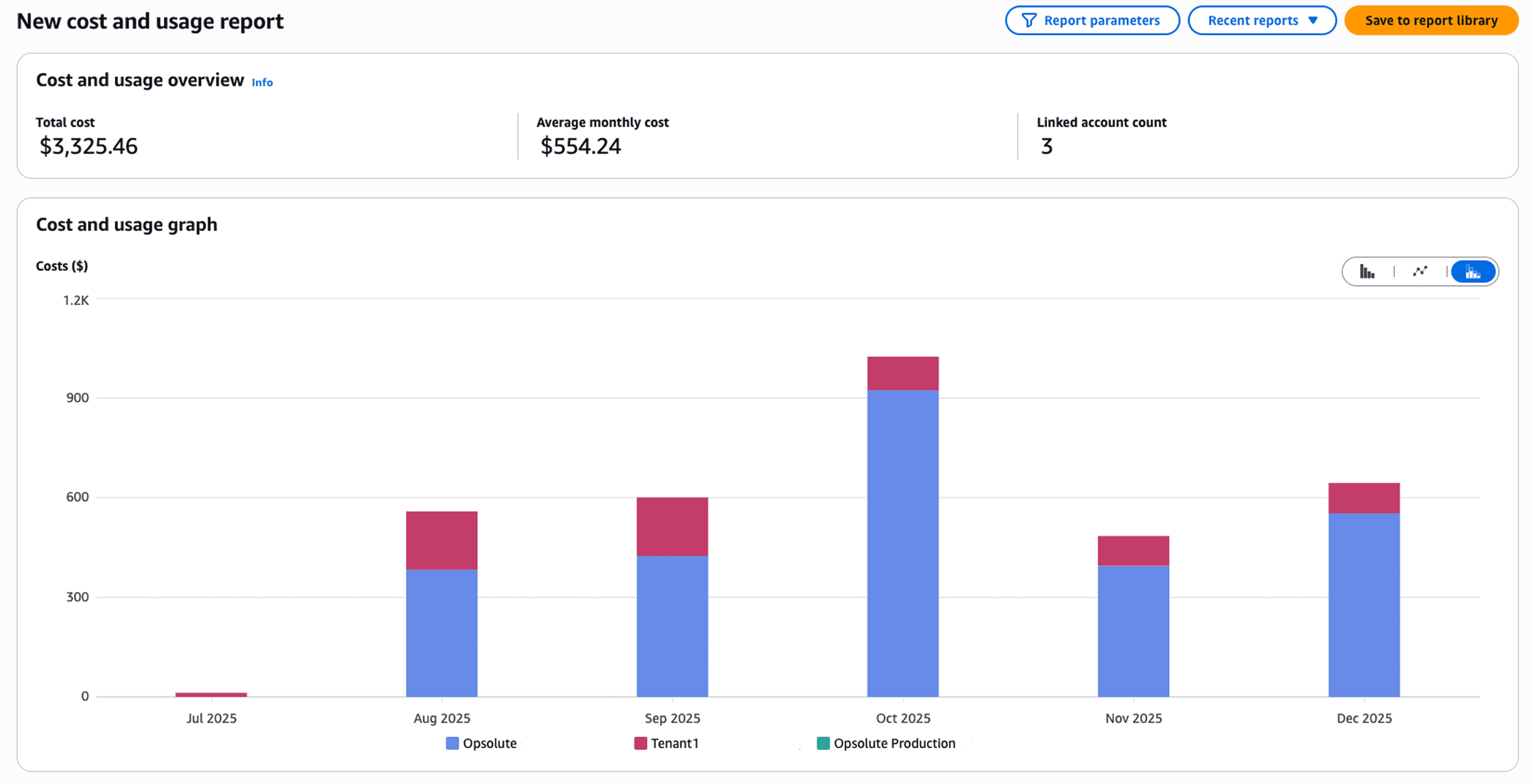
The first copy of centralized logs incurs no additional ingestion charges through CloudWatch Logs Centralization. Organizations can consolidate log data from multiple accounts into a single destination without doubling costs, improving both security visibility and operational efficiency.
Implementing Centralized Security and Compliance Controls
AWS Organizations integrates deeply with security services to create unified defense-in-depth. Enable CloudTrail at the organization level and every account automatically logs all API activity to a centralized log archive account. Administrators cannot disable logging within member accounts, ensuring complete audit trails even if attackers compromise individual accounts.
Security Hub aggregates findings from GuardDuty, Inspector, Macie, and other security services across all organization accounts into a single dashboard. Instead of checking each account separately, security teams review findings organization-wide. Automated remediation workflows can respond to threats across accounts simultaneously, containing incidents before they spread.
RCPs play a critical role in security architecture. At launch in November 2024, RCPs supported S3, STS, KMS, SQS, and Secrets Manager. As of mid-2025, RCP support expanded to include Elastic Container Registry and OpenSearch Serverless. This growing coverage enables comprehensive data perimeter enforcement across an expanding range of AWS services.
Declarative policies maintain baseline configurations as AWS evolves. Unlike SCPs that restrict permissions, declarative policies specify desired states: "all EC2 instances must have detailed monitoring enabled" or "S3 buckets must use default encryption." AWS continuously evaluates these policies and surfaces drift when configurations diverge from requirements.
Root access management, enabled by default for newly created member accounts since late 2024, removes root user credentials from member accounts entirely. The management account owner can grant temporary privileged sessions when needed for emergency access, but member accounts have no standing root credentials to protect or potentially compromise. This secure-by-default approach eliminates entire categories of security risks.
Multi-factor authentication enforcement across root users prevents over 99% of password-related attacks. AWS now requires MFA for root access across all account types, supporting FIDO-certified security keys and allowing up to 8 MFA devices per user.
IAM Identity Center provides centralized access management across all organization accounts. Users authenticate once with their corporate credentials, then assume roles in authorized accounts without separate passwords. This eliminates credential sprawl, keeps personally identifiable information out of IAM, and enables organizations to leverage existing identity providers for AWS access.
Setting Up AWS Organizations: Practical Implementation Steps
Creating an organization begins with choosing a management account. If you're starting fresh, create a new account specifically for management purposes. This account shouldn't run any workloads, minimizing the attack surface and simplifying security audits. Existing AWS users often convert an existing account, but carefully review what's currently running there before proceeding.
Navigate to the AWS Organizations console and choose "Create organization." AWS prompts you to select between consolidated billing only or all features mode. Always choose all features unless you have specific constraints. While you can upgrade later, it requires approval from all member accounts, creating unnecessary coordination overhead.
With your organization established, structure your first organizational units. Create a Security OU and an Infrastructure OU as foundational elements. These house accounts that serve your entire organization, keeping them separate from workload accounts. Then add Production and Development OUs for application workloads, establishing clear environment separation from day one.
Creating new member accounts happens through the Organizations console, CLI, or API. Specify an email address (unique across AWS), account name, and which OU should contain the account. AWS provisions the account within minutes, automatically making it a member of your organization subject to any policies attached to its OU. Accounts created since late 2024 have no root credentials by default when root access management is enabled.
Inviting existing accounts requires the account owner's approval. Send an invitation through Organizations, then the owner logs into the standalone account and accepts. Once accepted, the account becomes a member account losing some autonomy: you can apply SCPs and RCPs that restrict permissions, and billing consolidates to the management account.
Quick setup checklist:
Create or designate a management account, enable all features
Enable root access management for secure-by-default member accounts
Structure foundational OUs for Security, Infrastructure, and workload environments
Create or invite initial member accounts, organizing them into appropriate OUs
Configure centralized CloudTrail logging to a dedicated log archive account
Enable AWS Config organization-wide for configuration compliance monitoring
Implement initial Service Control Policies and Resource Control Policies, starting conservative then tightening based on needs
Integrate Security Hub and GuardDuty for unified threat detection across accounts
Testing policies before broad deployment prevents production disruptions. Create a dedicated OU containing test accounts, apply new SCPs and RCPs there first, and verify they don't block legitimate operations. Many organizations maintain a Policy Testing OU specifically for validating changes before rolling them to production.
Delegated administrators reduce management account usage. Services like Security Hub, GuardDuty, and Firewall Manager support registering member accounts as delegated administrators with permissions to manage the service across all organization accounts. This distributes operational responsibility while keeping critical control in the management account.
Common Pitfalls and Enterprise Best Practices
Management account isolation failures cause the most severe issues. Organizations that run workloads in the management account discover they cannot apply SCPs or RCPs to restrict those workloads, creating security gaps. Strict discipline: treat the management account solely for organization management, billing, and emergency access. All production workloads belong in member accounts.
Overly restrictive policies block legitimate operations, requiring emergency policy changes that bypass normal approval processes. Start with broad permissions and progressively tighten based on actual needs rather than theoretical requirements. Monitor CloudTrail for denied actions when deploying new policies, identifying unintended blocks before they impact production.
Missing test environments for policy changes leads to production outages. Organizations deploy SCPs and RCPs thinking they understand the implications, only to discover they've blocked critical operations. Always maintain a test OU mirroring production structure, validate policy changes there thoroughly, then roll to production incrementally.
Inadequate account lifecycle processes create abandoned accounts consuming costs. Establish clear procedures: request forms for new accounts, approval workflows, automated tagging for tracking ownership, and decommissioning processes. AWS charges are based on resource usage, not account count, but abandoned accounts often contain forgotten resources generating ongoing charges.
Tag policy enforcement failures undermine cost allocation. Organizations define tagging standards but don't enforce them through tag policies, resulting in inconsistent tagging and poor cost attribution. Implement tag policies early requiring critical tags, failing resource creation when tags are missing rather than trying to retrofit tags later.
Phone number management for account recovery often gets overlooked. AWS requires current phone numbers capable of receiving texts for account recovery. Using shared corporate phones creates coordination challenges during emergencies. Document phone numbers clearly, maintain them in a secure location separate from other credentials, and update AWS when numbers change.
Account limit misunderstandings cause planning issues. The default limit for new AWS Organizations is 10 accounts to prevent fraud, not 10,000. Most enterprises must proactively request increases to 1,000 or 10,000 accounts through Service Quotas. Plan ahead: if your multi-account strategy targets hundreds or thousands of accounts, request limit increases before you need them.
The proper balance: Organizations should make governance simpler, not more complex. If your OU structure confuses people, simplify it. If SCPs and RCPs require constant exceptions, they're too restrictive. If account creation takes weeks, your processes need streamlining. The goal is consistent security and governance that enables rather than blocks innovation.
FAQ
Q: How much does AWS Organizations cost? A: AWS Organizations itself is free with no additional charges. You only pay for AWS resources consumed within member accounts following standard service pricing. Consolidated billing aggregates usage across accounts, potentially qualifying for volume discounts that reduce overall costs.
Q: Can I migrate existing AWS accounts into an organization? A: Yes. Send invitations through the Organizations console to existing account owners. They must accept the invitation, after which the account becomes a member account subject to organizational policies. Member accounts can also be moved between organizations through a migration process.
Q: Do Service Control Policies and Resource Control Policies affect the management account? A: No. Neither SCPs nor RCPs apply to the management account, preventing you from accidentally locking yourself out. This is why AWS strongly recommends not running production workloads in the management account, minimizing the attack surface of the one account without policy protection.
Q: How do I handle account recovery if I enable root access management? A: With root access management enabled, member accounts have no root credentials to recover. Instead, management account administrators grant temporary privileged sessions for emergency access when needed. This model is more secure than maintaining root credentials that could be compromised.
Q: What happens to member accounts if I delete the organization? A: All member accounts become standalone AWS accounts again, retaining their resources and configurations. They're no longer subject to organizational policies or consolidated billing. Each account receives its own separate AWS bill going forward.
Q: Can different organizational units have different security requirements? A: Yes. You can attach different SCPs, RCPs, and other policies to different OUs or specific accounts. This enables customized security postures matching each workload's requirements while maintaining consistent baseline controls across the organization.
Q: How many accounts can I create in an AWS Organization? A: New organizations start with a default limit of 10 accounts to prevent fraud. Enterprises can request quota increases through Service Quotas to 1,000 or 10,000 accounts. AWS supports organizations with thousands of accounts using automation for management at scale.
Q: What's the difference between consolidated billing and all features mode? A: Consolidated billing provides only billing aggregation across accounts. All features mode includes consolidated billing plus service control policies, resource control policies, organizational units, policy management, and integrations with 45+ AWS services. All features mode is the recommended configuration for full organization capabilities.