Introduction
Amazon Web Services dominates the cloud computing market with a 30% share and 4.19 million customers, offering an extensive ecosystem of over 240 services and tools designed for every aspect of cloud operations. But navigating this vast landscape overwhelms even seasoned cloud architects. From developer tools that streamline CI/CD pipelines to AI-powered security solutions that detect multi-stage threats, choosing the right combination of AWS tools can make or break your cloud strategy.
This guide cuts through the complexity. We'll break down essential AWS tools across development, monitoring, security, and database categories, helping you understand which solutions fit your specific needs and how they work together to power efficient, secure cloud operations in 2026.
Key Highlights
AWS maintains 30% of the global cloud infrastructure market with 4.19 million customers, leading Microsoft Azure (20%) and Google Cloud (13%) as of Q3 2025
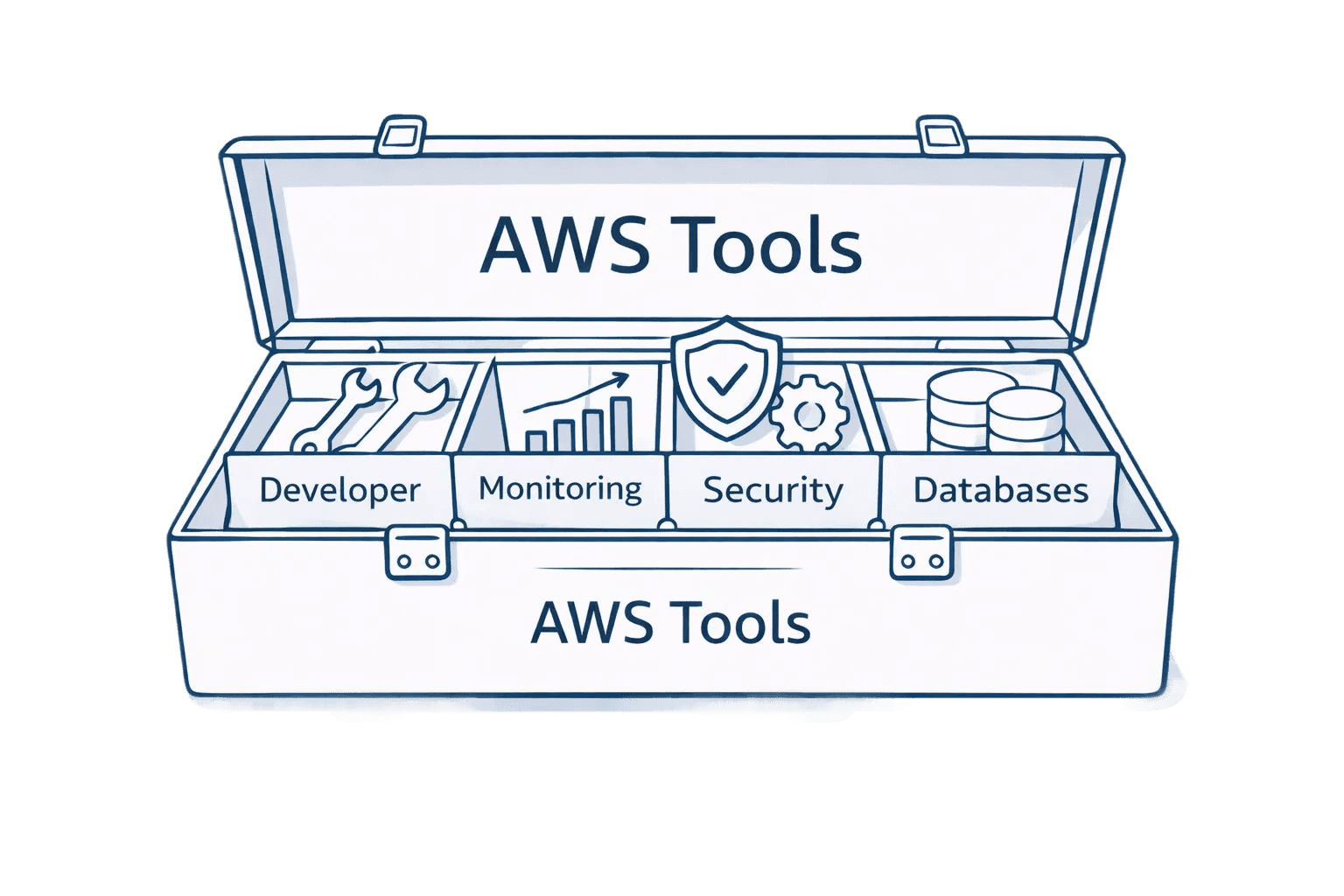
Essential AWS tools span six categories: developer tools (CodePipeline, CodeBuild), monitoring (CloudWatch, X-Ray), security (GuardDuty, IAM), databases (RDS, DynamoDB, Aurora), management (CloudFormation, Systems Manager), and compute/storage (EC2, Lambda, S3)
GuardDuty Extended Threat Detection launched in December 2025 uses AI to correlate security signals across network activity, process behavior, and malware execution to detect sophisticated multi-stage attacks.
Aurora DSQL reached general availability in May 2025, delivering 99.999% multi-region availability with active-active architecture and strong consistency across regions
AWS DevOps Agent previewed at re:Invent 2025 acts as an autonomous on-call engineer, analyzing data across CloudWatch, GitHub, and ServiceNow to identify root causes and coordinate incident response in AWS Tags
Database Savings Plans announced at re:Invent 2025 reduce database costs up to 35% with one-year commitments, while GuardDuty S3 malware scanning dropped 85% in price to $0.09 per GB
Understanding the AWS Tools Ecosystem
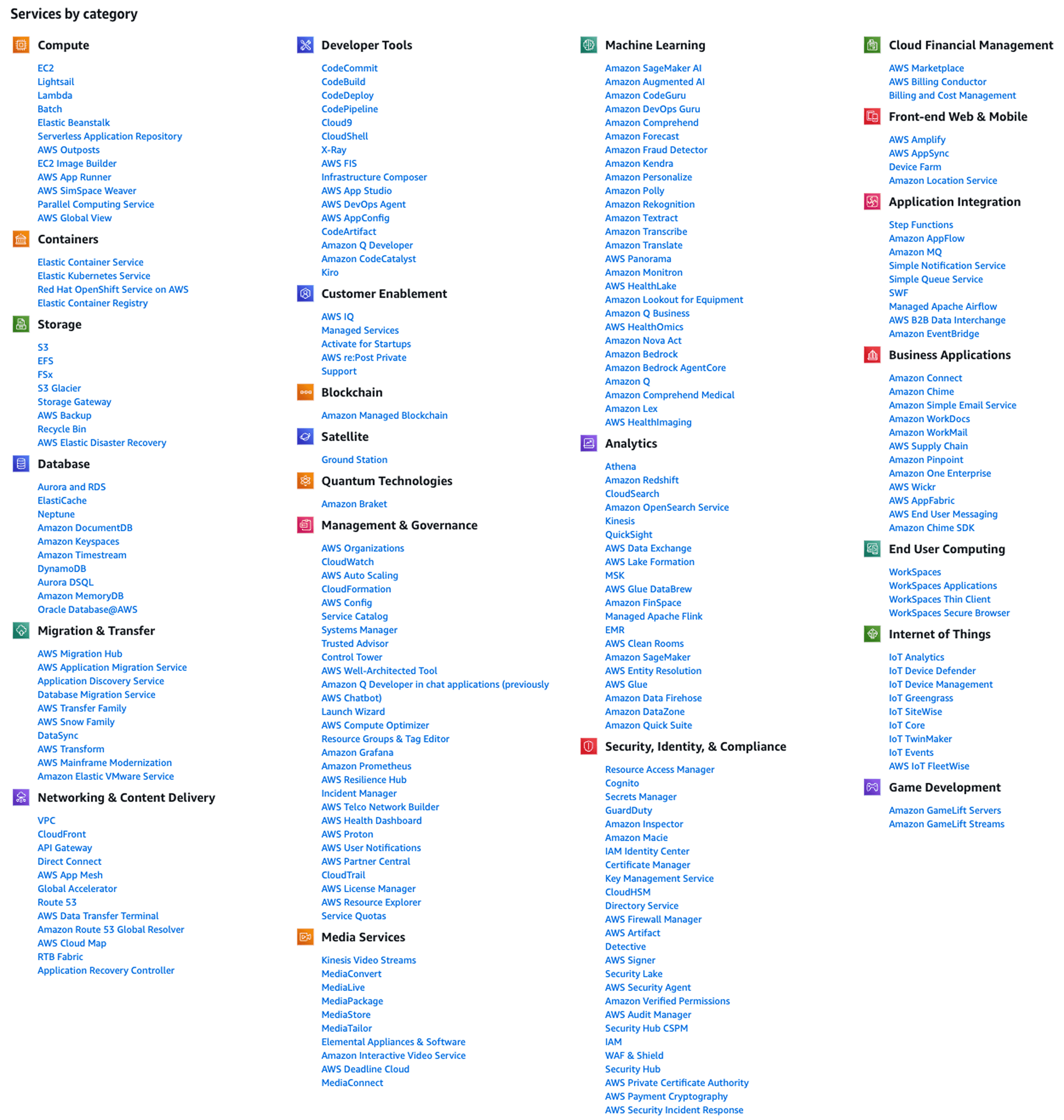
AWS categorizes its 240+ services across compute, storage, databases, security, and development. This structure mirrors how teams actually build and operate cloud applications. Think of AWS tools as building blocks: EC2 provides virtual servers, S3 handles object storage, RDS manages databases, and CloudWatch monitors everything. The real power emerges when these services integrate seamlessly.
The ecosystem expanded significantly in late 2025. At re:Invent in December, AWS unveiled frontier agents for development workflows, enhanced GuardDuty threat detection using machine learning, and Aurora DSQL with 99.999% multi-region availability. AWS also introduced Graviton5 processors delivering up to 25% better performance and Database Savings Plans that simplify cost commitments across multiple database services. These represent fundamental shifts in how teams build, secure, and scale cloud applications using AI and automation.
AWS Developer Tools for Building and Deploying Applications
AWS developer tools streamline the entire software development lifecycle. CodePipeline orchestrates CI/CD workflows by connecting source control, build systems, and deployment targets into automated pipelines. CodeBuild compiles source code and runs tests using Docker containers that scale automatically. CodeDeploy automates deployments across EC2, Lambda, and ECS with blue-green and canary strategies that minimize risk.
Together, these tools eliminate manual errors. A developer commits code to GitHub, CodePipeline detects the change and triggers CodeBuild to compile and test. If tests pass, CodeDeploy automatically deploys to development environments. After approval gates, the same pipeline deploys to staging and production with identical processes.
Cloud9 offers cloud-based IDEs that run directly in your browser without local installation. Developers can write, test, and debug code with pre-configured environments including AWS SDKs and CLI tools. This proves valuable for distributed teams where consistent development environments reduce configuration drift.
Tool | Primary Use | Key Benefit |
CodePipeline | CI/CD orchestration | Native AWS integration |
CodeBuild | Automated builds | Docker support |
CodeDeploy | Deployment automation | Blue-green deployments |
AWS Monitoring and Observability Solutions
CloudWatch provides comprehensive observability across metrics, logs, and traces. At re:Invent 2025, AWS enhanced CloudWatch with unified data management and built-in insights for generative AI applications. Teams can monitor model invocations, trace agent workflows, and identify performance bottlenecks without custom instrumentation.
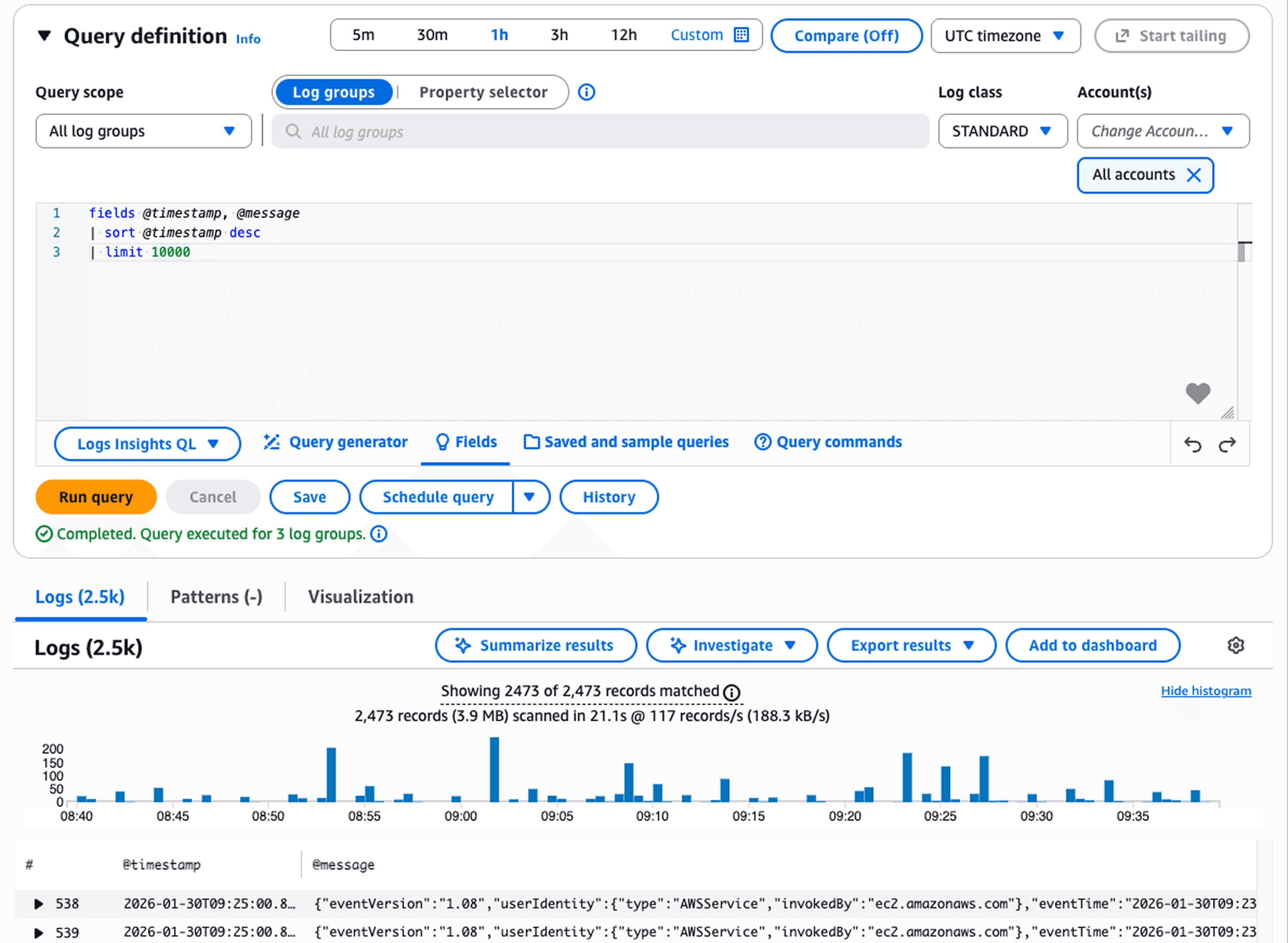
CloudTrail records every API call for auditing, compliance, and security analysis. X-Ray adds distributed tracing, mapping requests through microservices and identifying bottlenecks. CloudWatch's new AI-powered analysis activates comprehensive data collection to generate detailed incident documentation with root cause analysis.
The integration between monitoring tools has deepened significantly. CloudWatch now supports automatic normalization across data sources, native analytics integration, and built-in support for industry-standard formats like OCSF and Apache Iceberg. This reduces data management complexity while lowering costs.
AWS Security Tools for Threat Detection and Protection
Security spending and AWS Cost Management is projected to jump 77% from $213 billion in 2025 to $377 billion by 2028 as organizations adopt generative AI and expand their digital footprints. AWS security tools have evolved to meet these challenges.
GuardDuty uses machine learning to detect threats without requiring agents or additional infrastructure. It continuously analyzes CloudTrail logs, VPC Flow Logs, and DNS queries to identify cryptocurrency mining, compromised credentials, and reconnaissance activities. The December 2025 enhancements include Extended Threat Detection for EC2 and ECS workloads that correlates security signals across network activity, process runtime behavior, and malware execution to detect sophisticated multi-stage attacks.
GuardDuty Malware Protection expanded significantly in 2025. After launching S3 malware scanning in mid-2024, AWS reduced pricing by 85% in February 2025—dropping from $0.60 to $0.09 per GB scanned. By November 2025, GuardDuty added malware protection for AWS Backup, automatically scanning EC2, EBS, and S3 backups. The incremental scanning feature analyzes only changed data between backups, reducing costs while helping identify the last known clean backup for faster recovery.
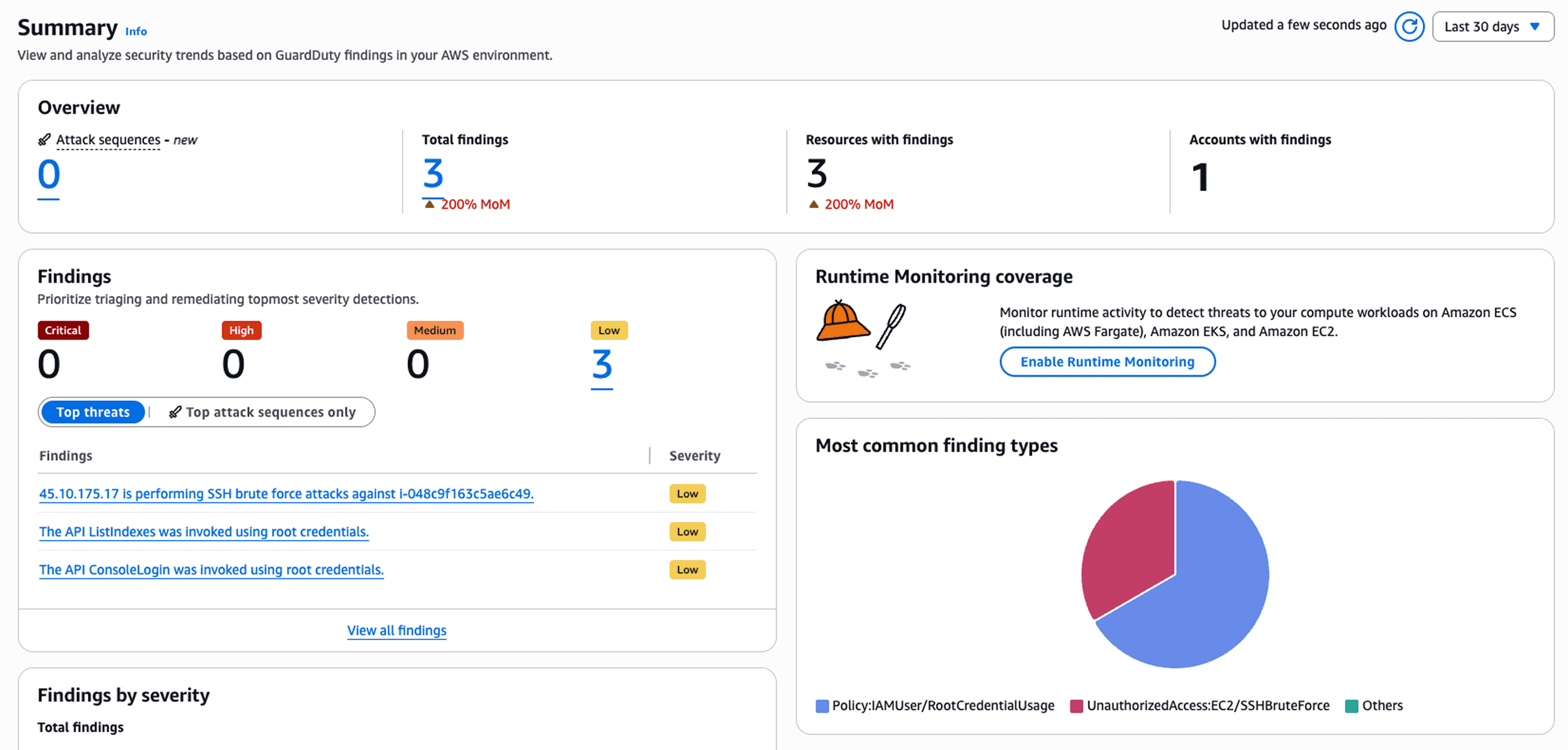
IAM manages access control across your entire AWS environment. The new IAM Policy Autopilot uses AI to analyze your code and generate baseline IAM policies, accelerating development while maintaining security best practices. AWS Security Hub centralizes security findings from GuardDuty, Inspector, and Macie. The 2025 update provides near-real-time risk analytics that automatically correlate security signals, showing attack sequences with MITRE ATT&CK mappings and remediation recommendations.
Security Tool | Detection Method | 2025 Enhancement |
GuardDuty | ML-powered threat intelligence | Extended multi-stage attack detection |
IAM | Policy-based access control | AI-generated policy creation |
Security Hub | Signal correlation | Near-real-time risk analytics |
AWS Database Tools: RDS, DynamoDB, and Aurora Compared
Amazon RDS provides managed relational databases supporting MySQL, PostgreSQL, MariaDB, Oracle, and SQL Server. RDS handles backups, patches, and replication automatically, making it ideal for teams requiring traditional SQL databases without operational overhead. In late 2025, AWS added Developer Edition support for SQL Server, M7i/R7i instance support, and expanded storage options up to 256 TiB.
DynamoDB excels at serverless applications requiring massive scale with single-digit millisecond latency. Optimized for key-value and document data models, DynamoDB fits gaming leaderboards, session stores, and IoT data ingestion use cases perfectly.
Aurora delivers superior performance compared to standard MySQL and PostgreSQL while maintaining compatibility. It automatically replicates data across three Availability Zones and scales storage up to 128 TB.
Aurora DSQL, generally available since May 2025, represents a breakthrough in distributed databases. It offers 99.999% multi-region availability with active-active architecture where both regional endpoints present a single logical database for concurrent read and write operations. Transactions immediately reflect across regions with strong consistency—no eventual consistency trade-offs. Aurora DSQL is currently available in ten AWS regions including US East, US West, Europe (Frankfurt, Ireland, London, Paris), and Asia Pacific (Seoul, Tokyo, Osaka).
AWS Database Savings Plans reduce costs up to 35% with one-year commitments. Unlike previous reservation models that locked you into specific database engines, Database Savings Plans apply flexibility across RDS, Aurora, DynamoDB, ElastiCache, Neptune, and DocumentDB—simplifying cost management for organizations running multiple database types.
Database Selection Guide:
RDS: SQL applications, complex queries, ACID compliance
DynamoDB: Serverless, key-value patterns, sub-10ms latency
Aurora: High-performance SQL, multi-region replicas
Aurora DSQL: Global apps, strong consistency, unlimited scale
AWS Management Tools for Infrastructure Operations
CloudFormation enables infrastructure as code, defining AWS resources in templates for consistent deployment across environments. Systems Manager provides unified visibility into operational data, allowing teams to patch servers, run commands at scale, and maintain compliance without individual instance access.
AWS Config tracks resource inventory and configuration changes, monitoring compliance against organizational policies. The AWS DevOps Agent, previewed in December 2025, acts as an autonomous on-call engineer. This frontier agent analyzes data across CloudWatch, GitHub, and ServiceNow to identify root causes and coordinate incident response. The agent builds topology maps of application resources, correlates telemetry from logs and metrics, and provides specific mitigation plans—all while learning from historical incident patterns to prevent future issues.
AWS Compute and Networking Tools
EC2 provides virtual servers with instance types optimized for different workloads. M9g instances powered by Graviton5—announced at re:Invent 2025—offer up to 25% better performance with 192 cores per chip and 5x larger cache. Lambda enables serverless computing with automatic scaling from zero to thousands of concurrent executions. Lambda Managed Instances, announced in late 2025, let you run Lambda functions on EC2 capacity while keeping the serverless operational model.
VPC provides network isolation with configurable subnets, route tables, and security groups. ECS and EKS orchestrate containerized applications. At re:Invent 2025, AWS introduced new EKS capabilities for workload orchestration and cloud resource management that handle infrastructure maintenance while providing enterprise-grade reliability.
AWS Storage Solutions and Content Delivery
S3 offers object storage with 11 nines of durability, storing unlimited data with automatic replication. S3 Tables added Intelligent-Tiering in late 2025 for automatic cost optimization when data access patterns change. EBS provides block storage for EC2 instances with volume types optimized for different performance needs. EFS offers shared file systems accessible by multiple instances. CloudFront distributes content globally, caching assets and accelerating responses.
Choosing the Right AWS Tools for Your Use Case
Start with core services addressing immediate needs. Startups begin with EC2, S3, and RDS, adding CloudWatch for monitoring. Enterprises implement CloudFormation for infrastructure as code, Systems Manager for operations, and Security Hub for centralized security findings.
Decision Framework:
Predictable Scale: EC2, RDS
Variable Scale: Lambda, DynamoDB
Global Apps: Aurora DSQL, CloudFront
Compliance: Config, CloudTrail, GuardDuty
Success with AWS tools like AWS Tags requires strategic selection based on workload requirements, not implementing every available service. The introduction of Database Savings Plans and AI-powered agents like AWS DevOps Agent simplifies cost management and operations. Teams can now commit to flexible database spending across multiple engines while autonomous agents handle incident response around the clock.
Optimizing AWS Tools Management with Opsolute
Managing multiple AWS tools across complex environments requires unified visibility and cost control. Opsolute enhances AWS efficiency through comprehensive cloud management and intelligent cost optimization.
Opsolute's tag recommender uses AI to automatically suggest tags for untagged resources. Tag organizers maintain semantic consistency across hierarchical structures, ensuring accurate cost allocation as your AWS footprint grows. The Infra Cost Estimator predicts spending before deploying resources, allowing teams to model configurations and compare costs across instance types and regions.
Anomaly detection catches unusual spending patterns within 24 hours, alerting stakeholders when test environments run unexpectedly or expensive instances get provisioned without approval. Chargeback mechanisms allocate costs to specific teams based on usage, enabling finance teams to generate accurate reports and accountability across the organization.
Conclusion
AWS tools provide comprehensive capabilities for building, deploying, monitoring, and securing cloud applications. The ecosystem continues evolving with AI-enhanced features like GuardDuty's ML-powered threat detection, Aurora DSQL's distributed architecture delivering 99.999% multi-region availability, and CloudWatch's AI-powered incident analysis. The introduction of frontier agents like AWS DevOps Agent marks a fundamental shift toward autonomous operations.
Success with AWS tools requires strategic selection based on workload requirements, not implementing every available service. Start with fundamentals addressing immediate needs and expand thoughtfully as complexity and scale demand additional capabilities.
Immediate Next Steps:
Audit current tool usage across development, monitoring, and security
Identify gaps between current capabilities and operational needs
Prioritize 2-3 tools providing highest impact for your workloads
Implement comprehensive monitoring with CloudWatch and CloudTrail
Enable GuardDuty for threat detection across all accounts
Managing AWS tools at scale requires platforms providing unified visibility, cost control, and operational efficiency. Schedule a free AWS infrastructure consultation with Opsolute to optimize your tool selection, implementation strategy, and cost management across multi-cloud environments.
Frequently Asked Questions
Q: What are the most essential AWS tools for beginners starting with cloud development?
A: Beginners should start with Amazon EC2 for compute resources, S3 for storage, and RDS for databases. These core services provide fundamental capabilities without overwhelming complexity. Adding CloudWatch for monitoring and IAM for security management creates a solid foundation for learning AWS operations.
Q: How do AWS developer tools integrate with existing CI/CD pipelines?
A: AWS developer tools like CodePipeline, CodeBuild, and CodeDeploy integrate with popular version control systems including GitHub and GitLab. CodeConnections (formerly CodeStar Connections) facilitates seamless integration, enabling teams to maintain existing workflows while leveraging AWS automation capabilities.
Q: What is the difference between CloudWatch and CloudTrail for monitoring?
A: CloudWatch monitors performance metrics, logs, and resource health in real-time, focusing on operational insights and application performance. CloudTrail records API calls and user actions for auditing, compliance, and security analysis. Both tools complement each other to provide comprehensive observability across AWS environments.
Q: How does Amazon GuardDuty detect threats without requiring additional infrastructure?
A: GuardDuty uses machine learning and integrated threat intelligence to continuously analyze CloudTrail logs, VPC Flow Logs, and DNS queries automatically. It requires no agents or additional infrastructure deployment, detecting threats like cryptocurrency mining, compromised credentials, and reconnaissance activities with automated findings and remediation recommendations.
Q: When should I choose DynamoDB over RDS or Aurora for my database needs?
A: Choose DynamoDB for serverless applications requiring massive scale, single-digit millisecond latency, and key-value access patterns. Select RDS when you need traditional SQL databases with complex queries and existing database expertise. Pick Aurora for high-performance relational workloads requiring superior availability and cloud-native scaling capabilities. Consider Aurora DSQL for globally distributed applications requiring strong consistency across multiple regions.
Q: What AWS tools help optimize cloud costs for growing organizations?
A: AWS Cost Explorer provides detailed spending analysis, while AWS Budgets sets spending alerts. Database Savings Plans offer up to 35% discounts across multiple database services with one-year commitments. CloudWatch helps identify underutilized resources, and AWS Trusted Advisor provides cost optimization recommendations across your entire infrastructure.
Q: What tools help manage resource inventory and tagging across AWS environments?
A: AWS Resource Groups and Tag Editor provide native tagging capabilities, while AWS Config tracks resource inventory and configuration changes. For comprehensive management across multi-cloud environments, platforms like Opsolute offer unified resource inventory with AI-powered search, tag recommenders for automated tagging, and tag organizers to maintain semantic consistency across hierarchical organizational structures.
Q: How can organizations manage costs when using multiple AWS tools simultaneously?
A: Organizations should implement FinOps practices with unified cost tracking platforms like Opsolute that provide real-time visibility across all AWS tools. Use cost allocation tags, set budget guardrails with threshold alerts, and leverage anomaly detection to catch unusual spending patterns. Regular right-sizing reviews and savings plan optimization help maintain cost efficiency as tool usage scales.