Introduction
Cloud migration promises cost savings. But here's what most teams discover too late: their actual AWS spending exceeds projections by 30-50%. Why? They calculated costs, not Total Cost of Ownership.
AWS TCO isn't just your monthly bill. It's the complete financial picture including compute, storage, data transfer, support contracts, operational labor, and hidden costs that blindside unprepared teams. When a mid-sized SaaS company migrated 200 servers to AWS, they budgeted $35,000 monthly based on pricing calculator estimates. Reality? $52,000 monthly once data egress, cross-region traffic, and additional support kicked in.
This guide shows you how to calculate AWS TCO accurately using a proven 5-step methodology. You'll learn which costs organizations consistently miss, how to compare AWS against on-premises infrastructure fairly, and strategies like AWS Savings Plans that reduce total ownership costs by 30-40% through proper analysis and optimization.
Key Highlights
Six cost categories comprise complete AWS TCO: compute, storage, data transfer, support, operational labor, and licensing
Hidden expenses like data egress and API calls add 15-25% to base projections
Right-sizing and reserved capacity typically deliver 30-40% cost reductions when properly implemented
On-premises comparisons must include facilities, power, cooling, hardware refresh, and dedicated IT staffing
Continuous monitoring through platforms like Opsolute prevents cost creep and maintains optimization gains
What is AWS Total Cost of Ownership (TCO)?
AWS TCO represents every dollar you spend to run workloads on Amazon Web Services over a specific period. Most teams mistake their monthly AWS bill for total cost. That's just direct infrastructure spending.
Real TCO includes direct costs (AWS Tags, EC2 instances, S3 storage, RDS databases) plus indirect costs (support plans, data transfer, training) plus operational costs (staff time managing infrastructure, migration effort, architectural changes).
Think of it like car ownership. The sticker price isn't your total cost. Add insurance, fuel, maintenance, registration, and depreciation. Same principle applies to AWS. The Pricing Calculator shows your infrastructure sticker price. TCO reveals what you'll actually spend.
Why does this distinction matter? A finance team evaluating a $500,000 annual AWS commitment needs to know the true number is closer to $650,000 when accounting for all factors. Budget for the lower number, and you'll face difficult conversations mid-year when reality hits.
Organizations that calculate AWS TCO properly before migration make smarter decisions. They identify optimization opportunities early, set realistic budgets using AWS Cost Management., and build accurate business cases that survive CFO scrutiny.
Why AWS TCO Matters for Your Business
Accurate TCO calculation isn't academic. It directly impacts three critical business outcomes.
Migration planning depends on realistic projections. When a financial services firm calculated only infrastructure costs, their business case showed 25% savings versus on-premises. After including data egress (their application served global customers), support contracts, and retraining costs, actual savings dropped to 8%. Still positive, but the revised timeline and expectations prevented a budget crisis.
Budget forecasting requires complete visibility. Finance teams build annual budgets 6-12 months ahead. Give them incomplete TCO data, and they'll under-allocate funds. This creates mid-year budget battles, delayed projects, or forced cost-cutting that impacts performance.
Cost optimization starts with understanding total ownership. You can't optimize what you haven't measured completely. Teams focusing only on EC2 costs miss that S3 storage and data transfer represent 40% of their spend. Opsolute's forecasting capabilities help here by predicting next-month spend with budget comparisons, identifying resources with increasing costs before they balloon into budget problems.
The stakes scale with infrastructure size. A startup running 20 instances might see $2,000 monthly variance between estimated and actual costs. An enterprise with 2,000 instances? That variance becomes $200,000 monthly or $2.4 million annually.
AWS TCO Components: Understanding All Cost Categories
Complete AWS TCO encompasses six distinct cost categories. Missing even one skews your projections significantly.
Compute Resources
EC2 instances, Lambda functions, ECS/EKS containers, and compute-related services form your largest cost category. A typical mid-sized deployment running 100 instances at $0.10/hour averages $7,200 monthly in compute costs alone. But that's on-demand pricing. Apply reserved instances or savings plans, and costs drop 40-60%.
Storage Infrastructure
S3 buckets, EBS volumes, EFS file systems, and database storage accumulate quickly. Storage costs seem negligible until you're managing 500TB of data. At $0.023/GB for S3 Standard, that's $11,500 monthly. Glacier Deep Archive drops it to $1,000 monthly, but only if you architect for it.
Data Transfer and Networking
Here's where organizations get surprised. Data egress (outbound transfer) costs $0.09/GB after the first GB. An application serving 10TB monthly to customers outside AWS pays $900 just for bandwidth. Cross-region data transfer adds another layer. Replicating 1TB daily between us-east-1 and eu-west-1 costs $20/day or $600/monthly.
AWS Support Plans
Basic support is free but effectively useless for production workloads. Business support (10% of monthly spend, minimum $100) provides reasonable response times. Enterprise support (10% with escalating discounts) includes a Technical Account Manager. For a $50,000 monthly infrastructure spend, that's $5,000 additional for support.
Operational Labor
Engineer time managing AWS infrastructure represents real cost even if it doesn't appear on your AWS bill. Three engineers spending 25% of their time on AWS operations at $150,000 annual salary equals $112,500 yearly or $9,375 monthly in labor costs.
Software Licensing
Windows Server licenses, commercial database engines, third-party security tools, and monitoring solutions add up. A SQL Server Enterprise instance costs an additional $1,000+ monthly beyond base EC2 costs. Some organizations moving from on-premises discover they're paying for licenses twice.
Cost Category | Typical Monthly Range | Key Variables |
Compute | $5,000 - $50,000+ | Instance types, utilization, commitment |
Storage | $1,000 - $15,000+ | Volume, tier selection, lifecycle policies |
Data Transfer | $500 - $10,000+ | Egress volume, architecture, CDN usage |
Support | $100 - $5,000+ | Spend level, required SLAs |
Labor | $3,000 - $15,000+ | Team size, AWS expertise level |
Licensing | $500 - $8,000+ | OS, database, third-party tools |
Step-by-Step: How to Calculate AWS TCO
Follow this 5-step methodology for accurate TCO calculation.
Step 1: Establish Your On-Premises Baseline
Document every cost associated with current infrastructure. Server hardware costs (purchase price amortized over 3-5 years), data center space (rack space, power, cooling), network equipment, storage arrays, software licenses, support contracts, and personnel costs.
For a 100-server on-premises deployment:
Hardware refresh: $500,000 over 4 years = $10,417 monthly
Data center facilities: $3,000 monthly
Power and cooling: $2,500 monthly
Network equipment: $1,200 monthly
Personnel (dedicated staff): $18,000 monthly
Software licenses and support: $4,500 monthly
Total baseline: $39,617 monthly
Step 2: Map Workloads to AWS Services
Identify equivalent AWS services for each component. Physical servers become EC2 instances or containers. SAN storage becomes EBS volumes and S3 buckets. Database servers map to RDS or self-managed databases on EC2.
Step 3: Calculate AWS Direct Costs
Use the AWS Pricing Calculator for infrastructure costs. Input your requirements (instance types, storage volumes, data transfer estimates) for accurate pricing. Apply reserved instance or savings plan discounts where appropriate.
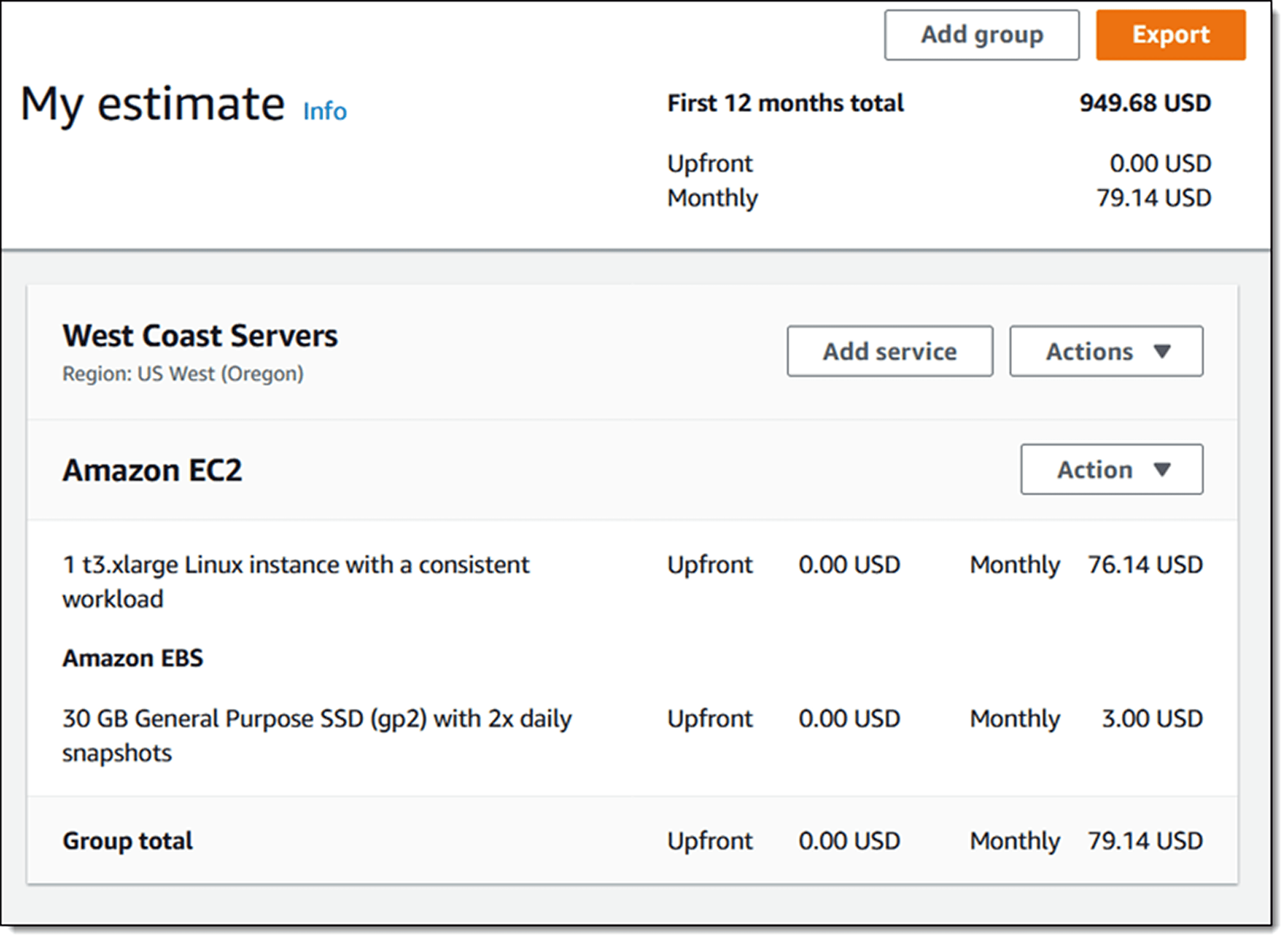
For the same workload:
Compute (EC2 with reserved instances): $14,400 monthly
Storage (EBS + S3): $3,800 monthly
Data transfer: $1,200 monthly
RDS databases: $2,600 monthly
Direct AWS costs: $22,000 monthly
Step 4: Factor Operational Costs
Add support plans, training, migration costs (amortized), and ongoing operational labor. Even managed services require oversight, security management, and optimization work.
Business support: $2,200 monthly
Training and certification: $500 monthly (amortized)
Operational labor (reduced but not eliminated): $6,000 monthly
Additional operational costs: $8,700 monthly
Step 5: Compare Total Ownership
On-premises TCO: $39,617 monthly ($475,404 annually) AWS TCO: $30,700 monthly ($368,400 annually) Savings: $8,917 monthly or 22.5%
This example shows conservative savings. Organizations implementing aggressive optimization often reach 35-40% reductions.
AWS TCO vs On-Premises: The Real Comparison
Fair comparison requires examining factors beyond infrastructure costs.
Capital vs Operational Expenses
On-premises demands significant upfront capital. That $500,000 hardware purchase ties up cash. AWS converts this to operational expense, improving cash flow and financial flexibility. CFOs often prefer this model even at slightly higher total cost.
Scaling Characteristics
On-premises infrastructure scales in large increments. You buy capacity for peak load plus growth buffer. AWS scales granularly. During off-peak hours, you reduce instances and pay less. A development environment running Monday-Friday 9am-6pm costs 30% of 24/7 pricing.
Hidden On-Premises Costs Often Forgotten
Facility costs (space, power, cooling), hardware refresh cycles every 3-5 years, redundant infrastructure for high availability, disaster recovery site maintenance, and opportunity cost of capital tied up in hardware. A complete on-premises analysis typically reveals 30-40% higher costs than initial calculations suggest.
When On-Premises Makes Sense
Highly predictable workloads with minimal variability sometimes favor on-premises. An application running at 90% capacity 24/7 for 5+ years might cost less on owned hardware. Regulatory requirements preventing cloud adoption (rare but real) force on-premises. Organizations with existing underutilized data centers and sunk costs face different economics.
Common TCO Calculation Mistakes (And How to Avoid Them)
Seven mistakes consistently skew TCO projections.
Ignoring Data Egress Costs
Data leaving AWS to the internet costs money. Teams forget to account for this until the first bill arrives. Solution: Calculate monthly outbound data transfer based on user base and application architecture. A customer-facing application serving 5TB monthly pays $450 in egress fees.
Over-Provisioning Resources
Migrating with "same size as on-premises" mentality wastes money. On-premises servers run at 15-20% average utilization because you can't scale dynamically. AWS permits right-sizing. Solution: Start with smaller instances and scale up based on actual usage data.
Neglecting Savings Plans and Reserved Instances
Running everything on-demand costs 2-3x more than necessary. Solution: After 2-3 months of usage data, commit to reserved instances or savings plans for steady-state workloads. This alone delivers 40-60% compute savings.
Forgetting Cross-Region Charges
Data transfer between AWS regions costs $0.02/GB. Applications with multi-region architecture rack up unexpected charges. Solution: Architect to minimize cross-region traffic or factor these costs into TCO from the start.
Underestimating Migration and Modernization Costs
Lift-and-shift migration is cheapest short-term but misses optimization opportunities. Refactoring applications for cloud-native architecture delivers better TCO long-term but requires investment. Solution: Model both approaches and choose based on application lifecycle.
Missing the Operational Learning Curve
Teams new to AWS spend more time managing infrastructure initially. Solution: Factor 3-6 months of elevated operational costs and training investment into your TCO model.
Not Accounting for Cost Optimization Time
Keeping AWS costs optimized requires ongoing effort. Solution: Include dedicated FinOps resources or platform tools like Opsolute's automated cost optimization in your operational cost projections.
AWS TCO Tools and Calculators You Should Use
Three categories of tools help calculate and manage AWS TCO.
AWS Native Tools
The AWS Pricing Calculator provides detailed cost estimates based on your configuration. Input instance types, storage requirements, and data transfer estimates for comprehensive pricing. Migration Evaluator (formerly TSO Logic) analyzes your existing infrastructure and recommends optimal AWS configurations with cost projections.
Strengths: Free, authoritative pricing, integrates with AWS services. Limitations: Requires detailed input, doesn't account for all operational costs, learning curve for complex architectures.
Third-Party Cost Management Platforms
CloudZero, Apptio, and similar platforms offer enhanced analytics and tracking. They connect to your AWS account, categorize spending, identify optimization opportunities, and provide detailed reporting.
Strengths: Automated tracking, trend analysis, anomaly detection. Limitations: Additional cost, requires integration setup, varying feature sets.
Professional Services
AWS Professional Services and partner consultants conduct comprehensive TCO assessments. They analyze your current state, interview stakeholders, model multiple migration scenarios, and deliver detailed reports.
Strengths: Expert analysis, custom recommendations, complete methodology. Limitations: Expensive ($15,000-$50,000+ depending on scope), time-intensive, benefits diminish for smaller deployments.
Choosing the Right Approach
Small deployments (under 50 instances): AWS Pricing Calculator plus spreadsheet analysis Medium deployments (50-500 instances): AWS tools plus cost management platform Large/complex deployments (500+ instances): Professional assessment plus ongoing platform monitoring
Real-World AWS TCO Calculation Example
Let's walk through a complete calculation for a mid-sized web application.
Current On-Premises Environment
40 application servers (8 cores, 32GB RAM each)
20TB total storage (SAN + local disk)
2 database servers (16 cores, 128GB RAM each)
Load balancers and network equipment
Data center space and power
2 dedicated infrastructure engineers
On-Premises Monthly TCO
Component | Monthly Cost |
Server hardware (amortized) | $8,500 |
Storage array (amortized) | $2,800 |
Network equipment (amortized) | $1,200 |
Data center facilities | $3,500 |
Power and cooling | $2,200 |
Database licenses | $4,000 |
Support contracts | $1,800 |
Personnel (2 engineers) | $25,000 |
Total | $49,000 |
AWS Infrastructure Design
30 m5.2xlarge instances (right-sized from 40 servers)
15TB EBS (gp3) + 5TB S3 (reduced from 20TB through optimization)
2 db.r5.4xlarge RDS instances
Application Load Balancer
Business support plan
AWS Monthly TCO
Component | Monthly Cost |
EC2 compute (1-year reserved) | $9,800 |
EBS storage | $1,500 |
S3 storage | $115 |
RDS databases (reserved) | $5,200 |
Data transfer | $1,400 |
Load balancer | $225 |
Business support (10%) | $1,824 |
Personnel (reduced to 30% time) | $7,500 |
Training (amortized) | $400 |
Total | $27,964 |
Result: 43% TCO Reduction
The organization saves $21,036 monthly or $252,432 annually. Key factors enabling this reduction: right-sizing from 40 to 30 instances, storage optimization reducing 20TB to 15TB, reserved instance pricing providing 45% compute discounts, and reduced operational overhead with managed RDS databases.
Optimizing Your AWS TCO with Smart FinOps Practices
Calculating TCO is step one. Optimizing it requires ongoing discipline.
Right-Sizing Implementation
Analyze utilization data monthly. An instance running at 20% CPU doesn't need 8 cores. Downsize and save 40-50%. Start with non-production environments to gain confidence, then apply learnings to production.
Savings Plans and Reserved Instances Strategy
Commit to savings plans for steady-state workloads after establishing baseline usage. Mix 1-year and 3-year terms based on workload maturity. Review quarterly as usage patterns evolve.
Spot Instance Adoption
Appropriate workloads (batch processing, CI/CD, development environments) run on spot instances at 70-90% discounts versus on-demand. A mixed instance strategy uses spot for fault-tolerant workloads and reserved instances for critical services.
Storage Tier Optimization
Implement S3 lifecycle policies moving data to cheaper tiers automatically. Logs accessed once quarterly don't need S3 Standard storage at $0.023/GB. Glacier Deep Archive at $0.00099/GB cuts costs by 95%.
Resource Tagging and Cost Allocation
Tag every resource with the owner, project, environment, and cost center. This enables accurate chargeback, identifies optimization opportunities by team, and prevents mystery costs no one claims ownership of.
Anomaly Detection and Budget Alerts
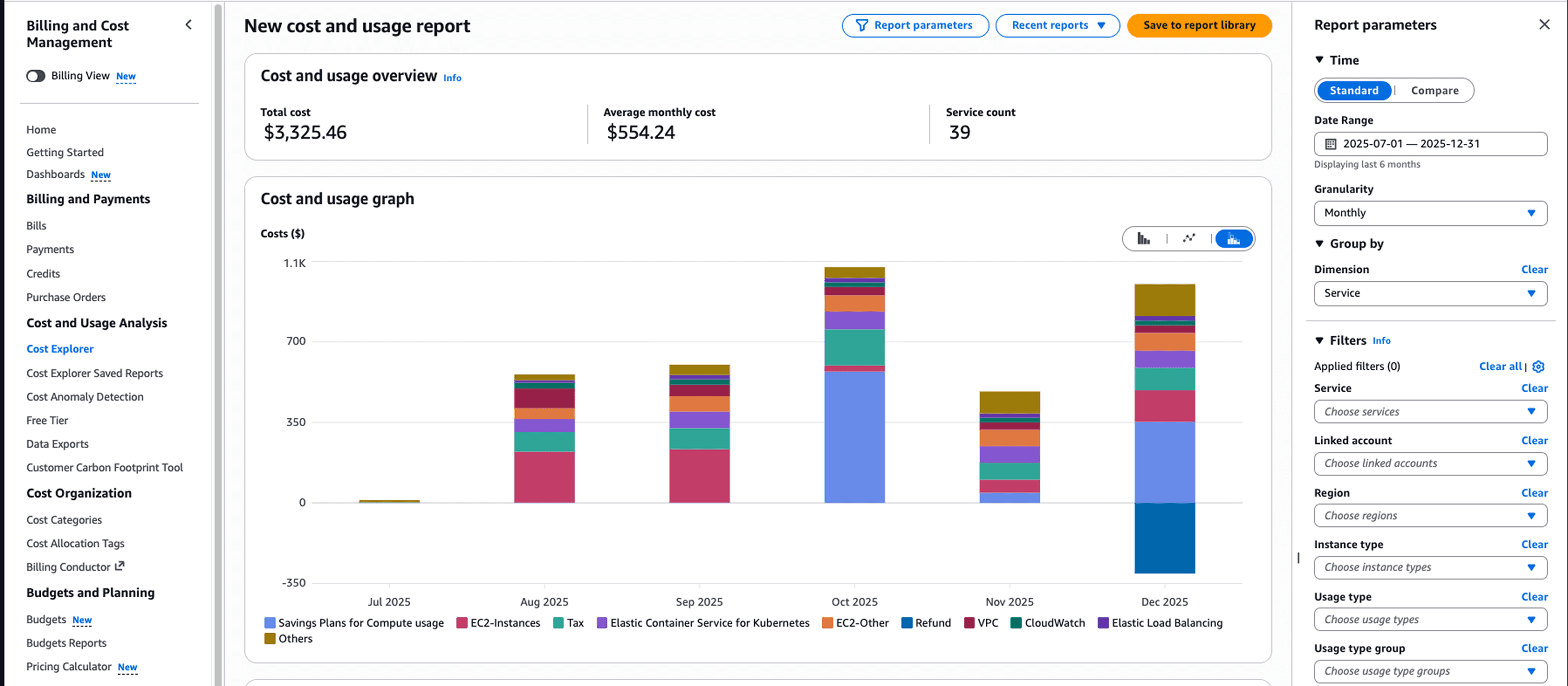
Set up AWS Cost Anomaly Detection or use platforms like CloudZero to catch spending spikes within 24 hours instead of discovering them at month-end. Configure budget alerts at 50%, 80%, and 100% thresholds.
Continuous Cost Review
Schedule monthly TCO reviews. What changed? Where did optimization work? What new inefficiencies appeared? Organizations treating cost optimization as ongoing practice maintain 30-40% savings. Those doing annual reviews watch costs creep back up.
From TCO Calculation to Continuous Cost Management with Opsolute
Manual TCO calculations provide valuable snapshots. But cloud infrastructure changes daily. Yesterday's accurate projection becomes tomorrow's underestimate as teams deploy new resources, traffic patterns shift, and workloads evolve.
Opsolute transforms one-time TCO analysis into continuous cost intelligence through two powerful capabilities.
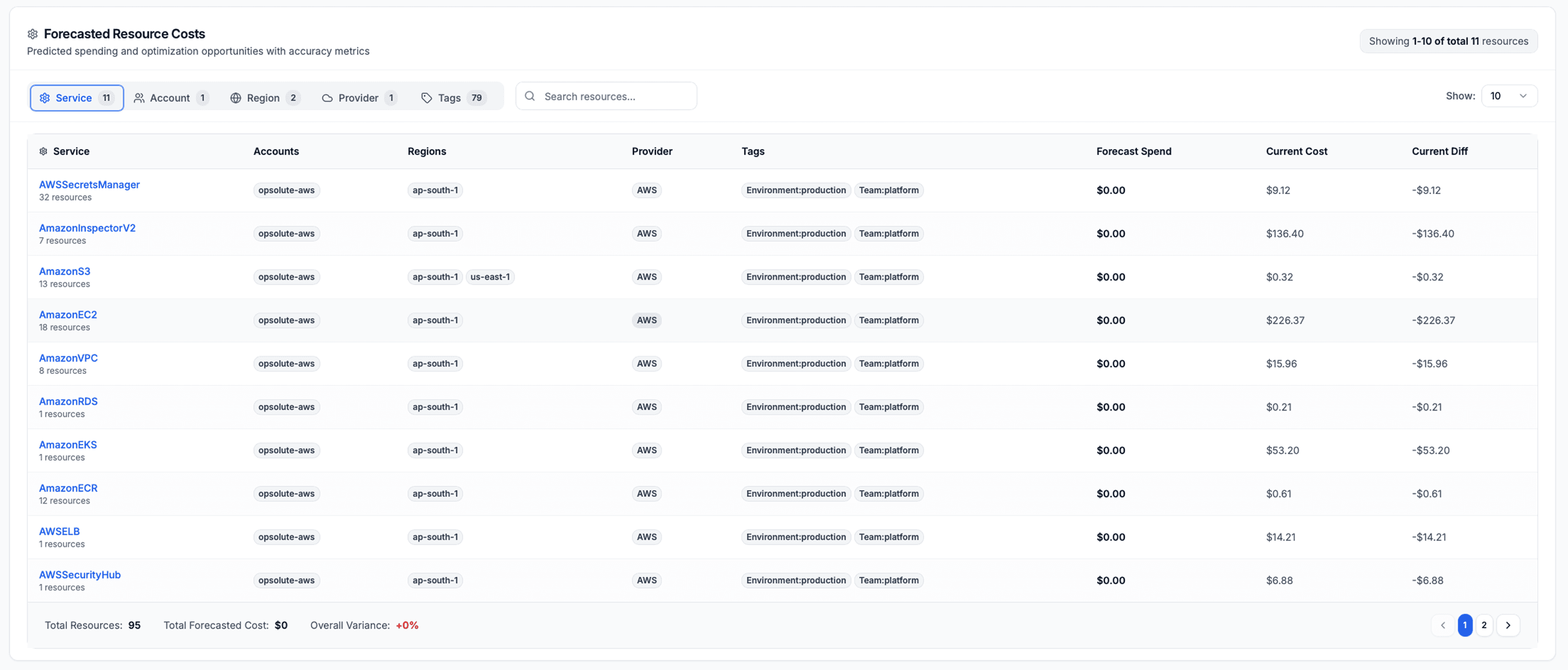
Forecasting for Proactive Budget Management
Opsolute's predictive analytics forecast next-month spending with budget comparisons, showing you exactly where costs are trending before they hit your account. The platform identifies resources with increasing costs early, when a small EC2 instance upgrade signals growing demand and potential budget overrun. Instead of discovering a 40% cost increase at month-end, you see the trend developing in week two and adjust accordingly.
The forecasting engine analyzes historical patterns, identifies seasonal variations, and projects costs across services, accounts, and teams. A FinOps manager sees that development environments show 15% month-over-month growth for three consecutive months. That's not budget noise - it's a signal requiring investigation.
Infra Cost Estimator for Pre-Deployment Accuracy
Before deploying new infrastructure, teams need accurate cost projections. Opsolute's Infra Cost Estimator allows pre-build planning with complete cost visibility. Configure your planned infrastructure (instance types, storage requirements, networking), and the estimator calculates base costs and applies savings plan discount projections automatically.
A platform team planning a new microservices environment selects 10 m5.xlarge instances, 5TB storage, and applicable load balancers. The estimator shows $8,200 monthly at on-demand rates but projects $5,100 with existing savings plans applied. They validate TCO projections before deployment rather than calculating costs reactively after resources are running.
This continuous approach prevents the common pattern where organizations calculate TCO once during migration, then watch actual costs drift 20-30% higher over 12 months due to unmanaged growth and optimization decay.
Frequently Asked Questions
What is the average AWS TCO compared to on-premises infrastructure?
Most organizations experience 30-40% lower TCO with AWS compared to on-premises when accounting for facilities, hardware refresh, and staffing. Actual savings vary based on workload characteristics, optimization discipline, and current on-premises efficiency. Highly virtualized, efficiently run data centers show smaller gaps.
How often should I recalculate my AWS TCO?
Perform comprehensive TCO recalculation quarterly during active migrations and annually for stable environments. Recalculate immediately when experiencing significant workload changes, major AWS pricing updates, or architecture modernization initiatives.
What are the most commonly overlooked costs in AWS TCO calculations?
Data egress fees, cross-region data transfer, API request charges, and increased operational labor during migration top the list. These hidden costs add 15-25% to initial projections when not properly accounted for. Support plan costs also surprise teams budgeting only for infrastructure.
Can AWS TCO be lower than the monthly AWS bill suggests?
Yes, when comparing total ownership properly. Monthly AWS bills appear high in isolation, but they include costs that on-premises infrastructure distributes across facilities, power, cooling, hardware depreciation, and dedicated staffing. True TCO comparison favors AWS more than bill-only comparison suggests.
What tools does AWS provide for TCO calculation?
AWS offers the Pricing Calculator for cost estimation and Migration Evaluator (formerly TSO Logic) for comprehensive TCO assessment. The Pricing Calculator works well for initial estimates with detailed service configurations. Migration Evaluator provides analysis based on actual infrastructure data collected from your environment.
How do reserved instances and savings plans affect AWS TCO?
Reserved instances and savings plans reduce compute costs by 40-70% compared to on-demand pricing, significantly lowering overall TCO. Factor these discounts into TCO calculations after determining stable baseline workload requirements through 2-3 months of usage data. Committing too early risks paying for unused capacity.
Is it worth hiring a consultant for AWS TCO analysis?
For large-scale migrations (1000+ servers) or complex multi-cloud environments, professional TCO assessment often justifies its $15,000-$50,000 cost through identified optimization opportunities. Smaller deployments under 200 instances typically achieve accurate results using AWS native tools and cost management platforms like Opsolute effectively.