
Moving to AWS isn't a one-size-fits-all journey. When GE Oil & Gas migrated 500 applications to AWS, they used multiple strategies and achieved roughly 30% cost savings through rehosting alone. The difference between migration success and failure? Matching each workload to the right strategy.
AWS's 7 Rs framework provides seven migration strategies: Retire, Retain, Rehost, Relocate, Repurchase, Replatform, and Refactor. This guide explores what is cloud cost optimization and breaks down each strategy with decision criteria, real ROI data, and implementation timelines so you can map your workloads confidently.
Key Highlights
AWS’s 7 Rs framework (Retire, Retain, Rehost, Relocate, Repurchase, Replatform, Refactor) provides a structured way to match each application to the most effective migration strategy
Most successful migrations combine 3–5 strategies across their application portfolio rather than relying on a single approach
Rehost (Lift & Shift) is the most common path, enabling fast cloud adoption and delivering immediate cost reductions of 30–50% for many organizations
Retiring unused workloads upfront can unlock instant savings, with 10–20% of applications often eligible for decommissioning before any migration starts
Replatforming delivers the best balance—requiring moderate effort while capturing 40–60% of the long-term benefits of full cloud modernization
Refactoring drives maximum transformation but demands significant time (6–12 months per app) and should be reserved for workloads with strong business justification
A disciplined approach using assessment tools, wave planning, dependency mapping, and phased execution consistently leads to better outcomes and lower migration risk
Understanding the AWS 7 Rs Migration Framework
The 7 Rs framework evolved from Gartner's original 5 Rs model, with AWS expanding it first to 6 Rs by adding Retire, then to 7 Rs by introducing Relocate. This framework is AWS's systematic approach to cloud migration planning.
Most successful migrations use 3-5 different strategies across their portfolio. You're not choosing one approach but building a strategy mix that balances speed, cost, and long-term value.
Strategy | Typical Usage | Timeline | Complexity |
Retire | 10-20% | Immediate | Low |
Retain | 5-15% | N/A | Low |
Rehost | 30-40% | 2-4 weeks | Low |
Relocate | 5-10% | 1-2 weeks | Low |
Repurchase | 10-15% | 1-6 months | Medium |
Replatform | 20-30% | 4-8 weeks | Medium |
Refactor | 5-15% | 6-12 months | High |
The strategies span from least effort (Retire) to maximum transformation (Refactor). The art is matching workload characteristics to the right point on that spectrum.
Retire: Eliminating What You Don't Need
Applications with average CPU and memory consumption below 5% can be retired immediately, while those with 5-20% consumption and no inbound requests over 90 days are also strong candidates. This delivers immediate cost savings without migration effort.
When a financial services company assessed their 300-application portfolio, they discovered 47 applications with zero logins in six months. Retiring these saved $840K annually before migrating anything.
The retirement process:
Identify candidates through usage analytics and stakeholder interviews
Verify no hidden dependencies
Archive data per retention policies
Decommission infrastructure
Pro Tip: Set clear criteria upfront and get executive buy-in early. Teams often resist decommissioning their applications, even when data shows zero usage.
Retain: Strategic Reasons to Keep Workloads On-Premises
Common retention scenarios include applications requiring compliance with data residency requirements, high-risk applications needing detailed assessment, dependencies on other systems that must migrate first, and recently upgraded applications.
A manufacturing company retained their factory floor control systems on-premises because microsecond latency to physical equipment was non-negotiable. They migrated analytics and business systems to AWS instead, capturing 70% of potential cloud benefits without risking production.
Review retained workloads annually. Compliance changes, cost shifts, and technology evolution may make previously unsuitable workloads cloud-ready.
Rehost (Lift and Shift): Fast Migration with Minimal Changes
Rehost involves moving applications to AWS without changes, and is the most common strategy for large-scale legacy migrations. GE Oil & Gas migrated 500 applications from 2014 to 2016, achieving a 52% reduction in total cost of ownership.
When rehosting makes sense:
Tight deadlines driven by data center contracts or hardware end-of-life
Limited cloud expertise on the team
Large-scale migrations where speed matters
Applications you'll optimize later
AWS Application Migration Service (MGN) provides highly automated migration at no license charge, expediting and simplifying the lift-and-shift process while decreasing potential for human error.
Post-rehost cloud cost optimization strategies and opportunities include replacing on-premises load balancers with Application Load Balancers, migrating backups to S3, and adding Auto Scaling. Each optimization delivers additional value without re-migrating.
Relocate: Hypervisor-Level Migration for Virtual Infrastructure
Relocate is the newest addition to the framework, designed for transferring virtual machines at the hypervisor level to AWS infrastructure. This strategy enables organizations to multiply cloud cost optimization tools to move virtualized workloads rapidly without conversion or reconfiguration.
Relocate vs. Rehost:
Aspect | Relocate | Rehost |
Infrastructure | Specialized cloud infrastructure | Native AWS EC2 |
Conversion | Minimal (hypervisor transfer) | VM to EC2 conversion |
Timeline | 1-2 weeks | 2-4 weeks |
Best For | Quick virtualized migrations | Long-term AWS integration |
Organizations with significant virtualization investments choose Relocate when they need rapid cloud migration, with common use cases including disaster recovery sites, data center exits under tight deadlines, and maintaining existing operational procedures during transition.
A healthcare provider used Relocate to move 400 virtual machines in three weeks. Over the following year, they selectively rehosted applications to native AWS as teams gained cloud skills, achieving deeper AWS integration.
Repurchase: Moving to SaaS Alternatives
Repurchasing typically involves moving to a SaaS platform, such as migrating a CRM to Salesforce.com, an HR system to Workday, or a CMS to Drupal.
A retail company spent $200K annually maintaining custom inventory management software. Switching to a specialized SaaS platform cost $80K yearly and delivered better functionality.
The trade-offs: You're exchanging customization for standardization. That custom workflow your team built over five years? The SaaS tool might not support it. Data migration is also challenging, requiring transformation to fit the SaaS data model.
When repurchase works best:
Your custom application doesn't provide competitive advantage
The SaaS alternative is industry-leading
You're willing to adapt processes to the platform
The vendor has clear data export capabilities
Replatform: Optimizing Without Full Redesign
Replatforming means optimizing on-premises workloads to run in the cloud while keeping the core architecture intact, requiring only partial code modification for relatively quick migration.
Practical replatform examples:
Migrate databases to Amazon RDS (managed service)
Move from WebLogic to Apache Tomcat
Containerize applications without code changes
Replace self-managed message queues with Amazon SQS
The replatform sweet spot: You invest 10-20% more effort than rehosting but capture 40-60% of the benefits you'd get from full refactoring.
Typical timeline:
Assessment and planning: 1-2 weeks
Environment setup and testing: 2-3 weeks
Migration execution: 1-2 weeks
Validation and optimization: 1-2 weeks
Refactor (Re-architect): Building Cloud-Native Applications
Refactoring involves re-imagining how applications are architected and developed using cloud-native features, typically driven by strong business needs to add features, scale, or achieve performance difficult in existing environments.
When refactoring justifies the investment:
Scaling limitations block business growth
Frequent changes required (microservices enable independent deployment)
Cost optimization demands are severe
Competitive pressure requires faster innovation cycles
Netflix completely re-architected their monolithic application into hundreds of microservices, enabling thousands of daily deployments and scaling to 200+ million subscribers.
The reality check: Plan 6-12 months for complex applications, often longer. You need architects who understand distributed systems, developers skilled in cloud-native patterns, and business stakeholders willing to fund transformation.
Common refactor patterns:
Monolith to microservices
Virtual machines to containers or serverless
Relational to NoSQL databases
Synchronous to event-driven architecture
Critical Insight: Refactor because business needs demand it, not because technology excites you. If replatform delivers sufficient benefits, don't over-invest in refactoring.
Choosing Your Migration Strategy: Decision Framework
Common migration strategies for large migrations include rehost, replatform, relocate, and retire, with refactor not recommended for large migrations because it involves modernizing applications during migration.
Start with these filtering questions:
1. Should this application exist?
No usage in 6+ months → Retire
Duplicate functionality → Retire
2. Must it stay on-premises?
Regulatory requirements → Retain
Active redesign in progress → Retain
3. What's driving the timeline?
Data center closing in under 6 months → Rehost (speed matters)
Moderate pressure (6-12 months) → Replatform (balanced approach)
Strategic transformation (12+ months) → Refactor (if justified)
4. What's the workload profile?
Virtual infrastructure needing quick migration → Relocate
Custom apps with SaaS equivalents → Repurchase
Database-heavy with administration burden → Replatform (to RDS)
Scaling bottlenecks limiting growth → Refactor
A manufacturing company with 250 applications categorized them across all seven strategies and migrated in four waves over 18 months, starting with 20 non-critical applications to build skills.
Implementation Best Practices and Common Pitfalls
Critical success factors:
Stakeholder alignment: Get buy-in from application owners, finance, security, and business leaders before migration begins.
Dependency mapping: A full analysis of your environment with a map of interdependencies, along with migration strategies and priorities, is key to building a successful migration plan.
Testing protocols: Build comprehensive test plans covering functionality, performance, security, and disaster recovery. Testing is 30-40% of migration effort.
Wave planning: Start with non-critical applications, learn, adjust your approach, then tackle complex systems.
Common mistakes:
Inadequate assessment: Teams underestimate complexity and miss dependencies. Spend 15-20% of project time on thorough assessment.
Insufficient testing: Test with production-realistic data volumes and traffic patterns.
Neglecting security: Cloud security models differ from on-premises. Applications designed for perimeter security need redesign for zero-trust cloud environments.
Tools by migration phase:
Phase | AWS Tool | Purpose |
Assess | AWS Migration Evaluator | Business case and TCO analysis |
Assess | AWS Application Discovery Service | Inventory and dependency mapping |
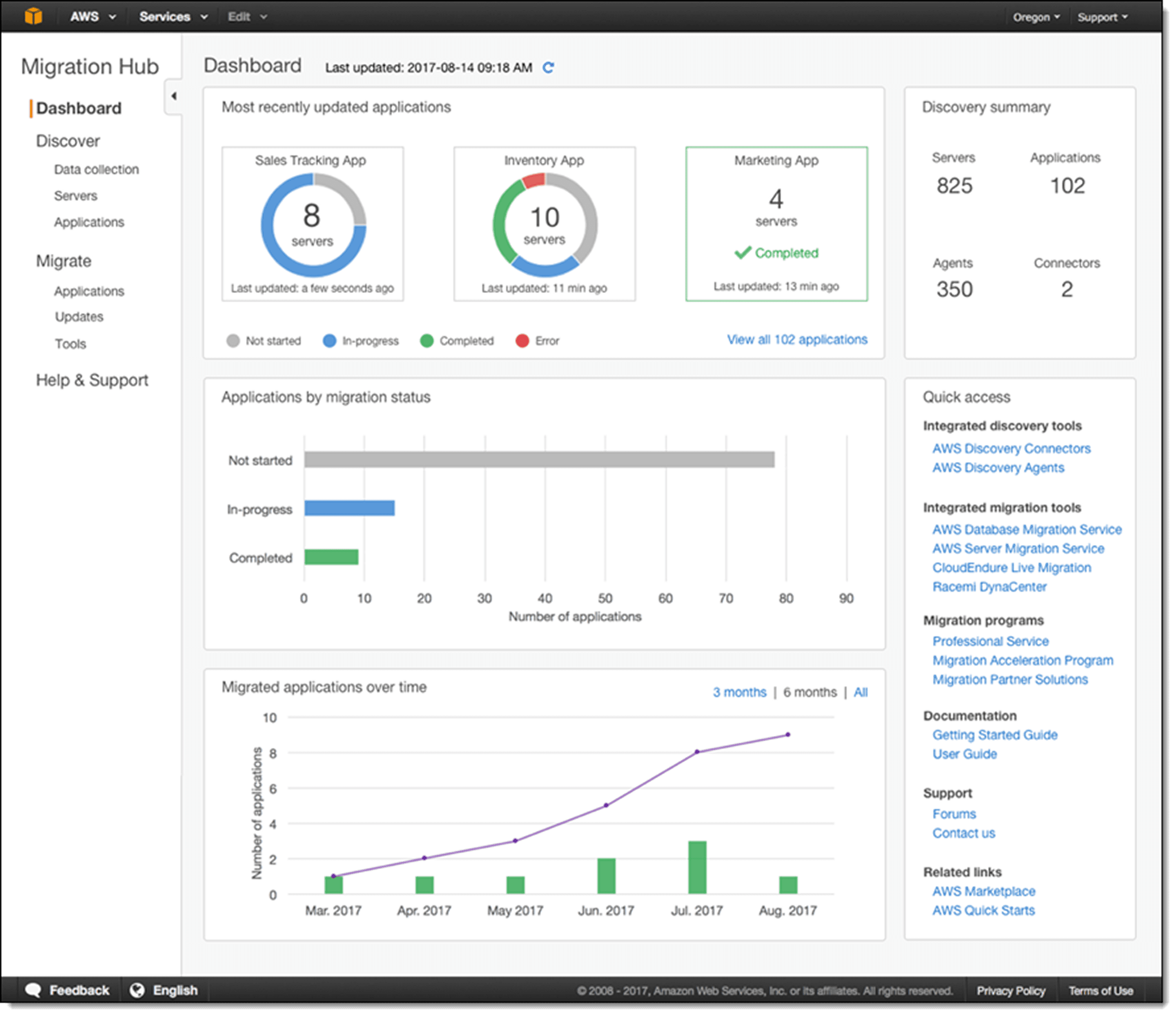
Mobilize | AWS Migration Hub | Centralized tracking and planning |
Migrate | AWS Application Migration Service | Automated rehost migrations |
Migrate | AWS Database Migration Service | Database migration with minimal downtime |
Optimize | AWS Cost Explorer | Right-sizing and cost optimization |
AWS offers the Migration Acceleration Program (MAP), a comprehensive cloud migration program based on experience migrating thousands of enterprise customers, providing tools, training, expertise from AWS Partners, and AWS investment.
Frequently Asked Questions
Q: What is the most commonly used AWS migration strategy?
A: Rehost (lift and shift) accounts for 30-40% of migrations. Organizations choose rehosting for quick wins, tight deadlines, or large-scale migrations where speed matters.
Q: How do I decide between replatform and refactor?
A: Choose replatform when you want cloud benefits without major code changes (10-20% effort delivering 30-50% of benefits). Choose refactor when you need dramatic improvements and have 6-12 months plus specialized skills available.
Q: Can I use multiple migration strategies in a single project?
A: Absolutely. Most organizations use 3-5 different strategies across their portfolio. Different workloads have different characteristics that make specific strategies optimal.
Q: What percentage of applications can be retired?
A: Industry data shows 10-20% of enterprise IT portfolios can be retired during migration assessment.
Q: How long does each strategy take?
A: Rehost takes 2-4 weeks per application. Replatform requires 4-8 weeks. Repurchase ranges from 1-6 months. Refactor often requires 6-12 months for complex applications. Relocate is fastest at 1-2 weeks for VMware workloads.
Q: What is the difference between Relocate and Rehost?
A: Relocate is hypervisor-level migration for VMware workloads to VMware Cloud on AWS, transferring VMs without conversion. Rehost converts applications to native AWS infrastructure (EC2), requiring some reconfiguration but offering better AWS service integration.
Q: Do I need to migrate everything at once?
A: No. AWS recommends a phased wave approach where you migrate workloads in groups over time, starting with non-critical applications to build experience.
Q: What tools does AWS provide to automate migration?
A: AWS offers AWS Application Migration Service (MGN) for rehosting, AWS Database Migration Service (DMS) for databases, AWS Migration Hub for tracking, AWS Application Discovery Service for assessment, and AWS Migration Evaluator for business case analysis.
Taking Your Next Step
The 7 Rs framework transforms overwhelming migration decisions into structured choices. You now understand when to rehost for speed, replatform for balance, or refactor for transformation.
Your immediate actions:
Inventory your application portfolio with business criticality and technical characteristics
Apply the decision framework to categorize applications by optimal strategy
Identify quick wins through retirement candidates and simple rehost migrations
Map dependencies for critical applications
Plan your first migration wave with 10-20 low-risk applications
Organizations that migrate strategically achieve 30-50% better outcomes than those that guess. Start with clarity.



