Introduction
Cloud costs are spiraling, companies waste an estimated 35% of their cloud budget on idle resources, overprovisioned instances, and services nobody tracks. With global cloud spending projected to exceed $720B, the question isn't whether you need a cost optimization tool, but which one will actually deliver ROI. This guide cuts through the vendor noise with transparent pricing comparisons, real implementation timelines, and a framework to select tools based on your cloud maturity, not marketing hype.
Key Highlights
Companies typically waste 25–35% of cloud spend on idle resources, overprovisioning, and unused commitments
Native tools from AWS, Azure, and GCP provide basic visibility but lack real-time detection, multi-cloud support, and business-level cost allocation
Modern cloud cost optimization platforms connect infrastructure spend to teams, products, customers, and features
Core capabilities to evaluate include anomaly detection, rightsizing automation, budget guardrails, and forecasting
Kubernetes and AI workloads require specialized tools to manage rapidly changing resource usage
Organizations using the right FinOps tools commonly achieve 15–25% savings in 90 days and 20–40% within the first year
Unified platforms reduce tool sprawl and enable continuous optimization instead of reactive monthly cost reviews
1.What Are Cloud Cost Optimization Tools? (And Why Native Tools Aren't Enough)
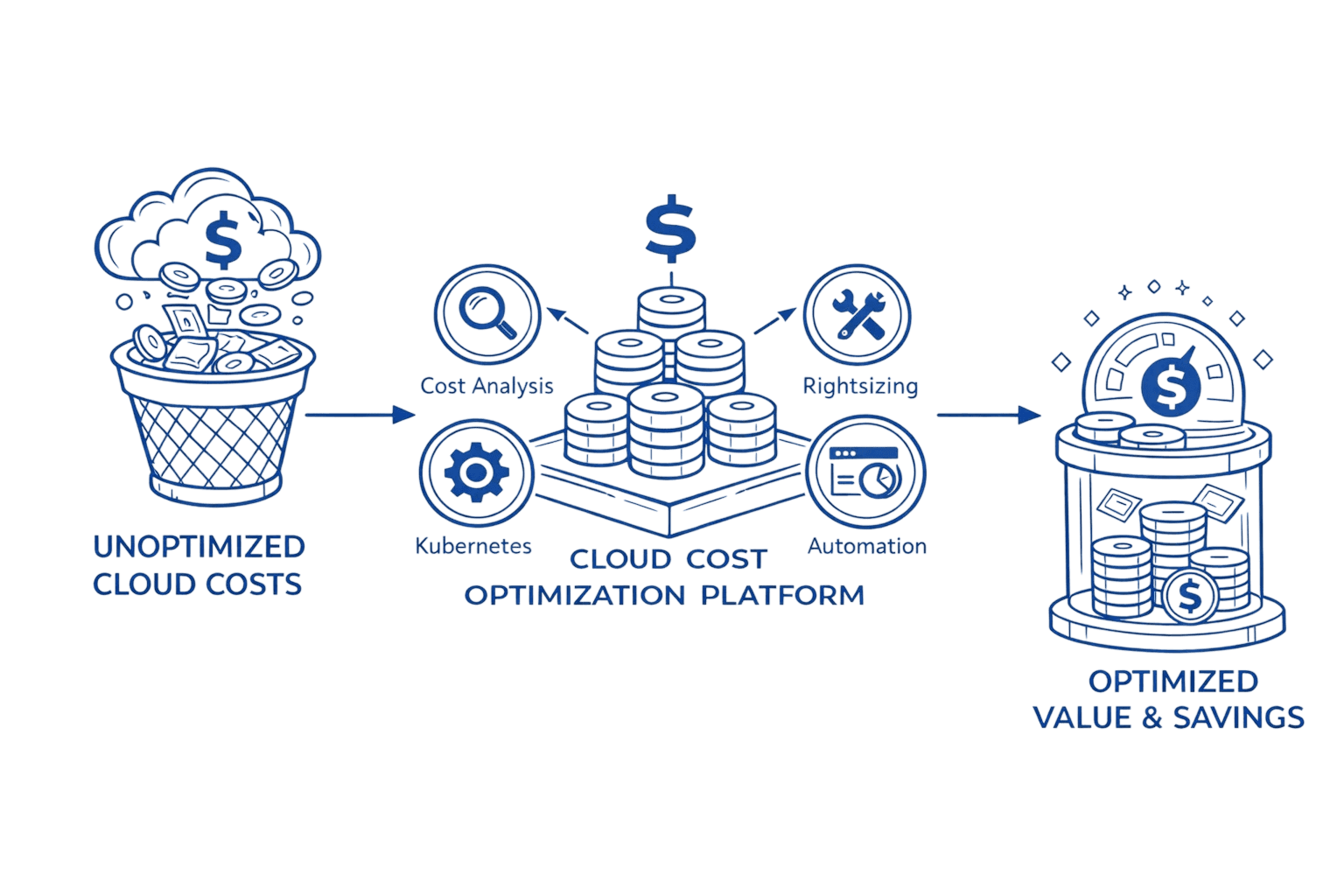
Cloud cost optimization tools do more than track spending. They identify waste, automate rightsizing, predict anomalies, and connect infrastructure costs to business outcomes.
AWS Cost Explorer, Azure Cost Management, and GCP's native tools are generally included without additional charge for a standard cloud subscription, providing foundational visibility into where money is going within their respective ecosystems. The primary limitations are that they don't work well across multiple clouds, lack real-time anomaly detection, and can't always tie costs to granular business metrics like cost-per-customer or cost-per-feature
At its core, cloud cost optimization is the ongoing discipline of aligning infrastructure spend with actual business value, and modern tools exist to operationalize that discipline continuously rather than through reactive monthly reviews. Modern FinOps platforms evolved beyond billing dashboards. They answer questions native tools can't: "Which microservice is driving our Lambda costs?" or "Why did our Kubernetes cluster spend jump 40% last Tuesday?" These platforms connect infrastructure decisions to business metrics, making cost optimization a continuous practice rather than a monthly fire drill.
2.The Real Cost of Cloud Waste: Why This Matters Now
Analysis of 500+ enterprise cloud deployments reveals consistent patterns. Idle resources account for 10-12% of wasted spend, test environments running 24/7, forgotten EC2 instances, databases nobody uses. Overprovisioning adds another 8-10%, driven by "better safe than sorry" capacity planning. Another 3-4% disappears into unused reserved instances and savings plans purchased with optimistic growth projections.
The financial impact compounds fast. A SaaS company spending $100K monthly loses $27K to waste, that's $324K annually. Scale that to $1M monthly spend, and you're burning $270K monthly or $3.24M annually. Money that could fund senior engineers or entire product initiatives.
Kubernetes and AI workloads make this worse. Container sprawl creates thousands of ephemeral resources that traditional tools struggle to track. LLM inference costs can spike 10x during unexpected traffic surges. One engineering team discovered their weekend spike test left 47 GPU instances running for three months, costing $73K nobody noticed until the quarterly review.
Waste Category | Percentage | Monthly Impact ($100K Spend) | Root Cause |
|---|---|---|---|
Idle Resources | 10-12% | $10,000-$12,000 | Forgotten test environments, unused instances, stopped VMs still incurring charges |
Overprovisioning | 8-10% | $8,000-$10,000 | Conservative capacity planning, fear of performance issues, "better safe than sorry" sizing |
Unused Commitments | 3-4% | $3,000-$4,000 | Reserved Instances and Savings Plans that don't match actual usage patterns |
Unoptimized Storage | 2-3% | $2,000-$3,000 | Wrong storage tiers, lack of lifecycle policies, excessive snapshots. |
Data Transfer & Other | 3-4% | $3,000-$4,000 | Inefficient architecture, unnecessary cross-region movement, orphaned resources |
Total Waste | 27% approx | $27,000 | Lack of visibility, governance, and continuous optimization |
3.Core Features That Actually Matter: A Practical Framework
Not all features deliver equal value. Your company size and cloud maturity determine what's essential versus nice-to-have.
Must-have features for everyone: Effective cloud cost optimization metrics—such as idle spend percentage, rightsizing savings potential, anomaly frequency, commitment utilization, and cost per team or service—are what turn tool outputs into prioritized, defensible action.
Cost visibility and allocation - See spending by service, team, project, or environment. Without this, you're managing cloud costs blind.
Anomaly detection - Catch billing spikes within hours, not weeks. One platform user caught a misconfigured autoscaling rule that would have cost $12K overnight.
Rightsizing recommendations - Identify oversized instances and underutilized resources with specific savings estimates.
Critical for mid-market and enterprise:
Budget guardrails - Set spending limits with automated alerts before costs spiral. Think of it like credit card spending alerts, but for cloud infrastructure.
Forecasting - Predict spending based on growth trends. Finance teams need this for quarterly planning. Forecasting cloud costs enables finance and procurement teams to plan budgets, size commitments like Reserved Instances and Savings Plans, and prevent surprise overruns by turning historical usage patterns into forward-looking spend expectations.
Showback and chargeback - Allocate costs to departments or products. Essential when multiple teams share infrastructure.
Advanced capabilities for mature FinOps practices:
Unit economics tracking - Calculate cost-per-transaction, cost-per-customer, or cost-per-feature. This connects infrastructure efficiency to business KPIs through cloud cost optimization strategies .
Kubernetes optimization - Pod-level visibility, cluster rightsizing, and multi-tenant cost allocation for containerized environments.
Commitment management - Automated RI and Savings Plan recommendations that adapt to usage patterns.
Platforms like Opsolute deliver this spectrum, Dashboard for unified visibility, Anomaly Detection modules, Budget Guardrails for governance, and Intelligent Showback that distributes costs hierarchically across teams and departments.
4.Cloud Cost Optimization Tools Comparison: The Honest Breakdown
The landscape divides into four categories, each serving different needs. Here's an in-depth look at the leading platforms Cloud Cost Optimization Tools Comparison: The Honest Breakdown
The landscape divides into four categories, each serving different needs. Here's an in-depth look at the leading platforms.
Multi-Cloud Platforms
1. Opsolute
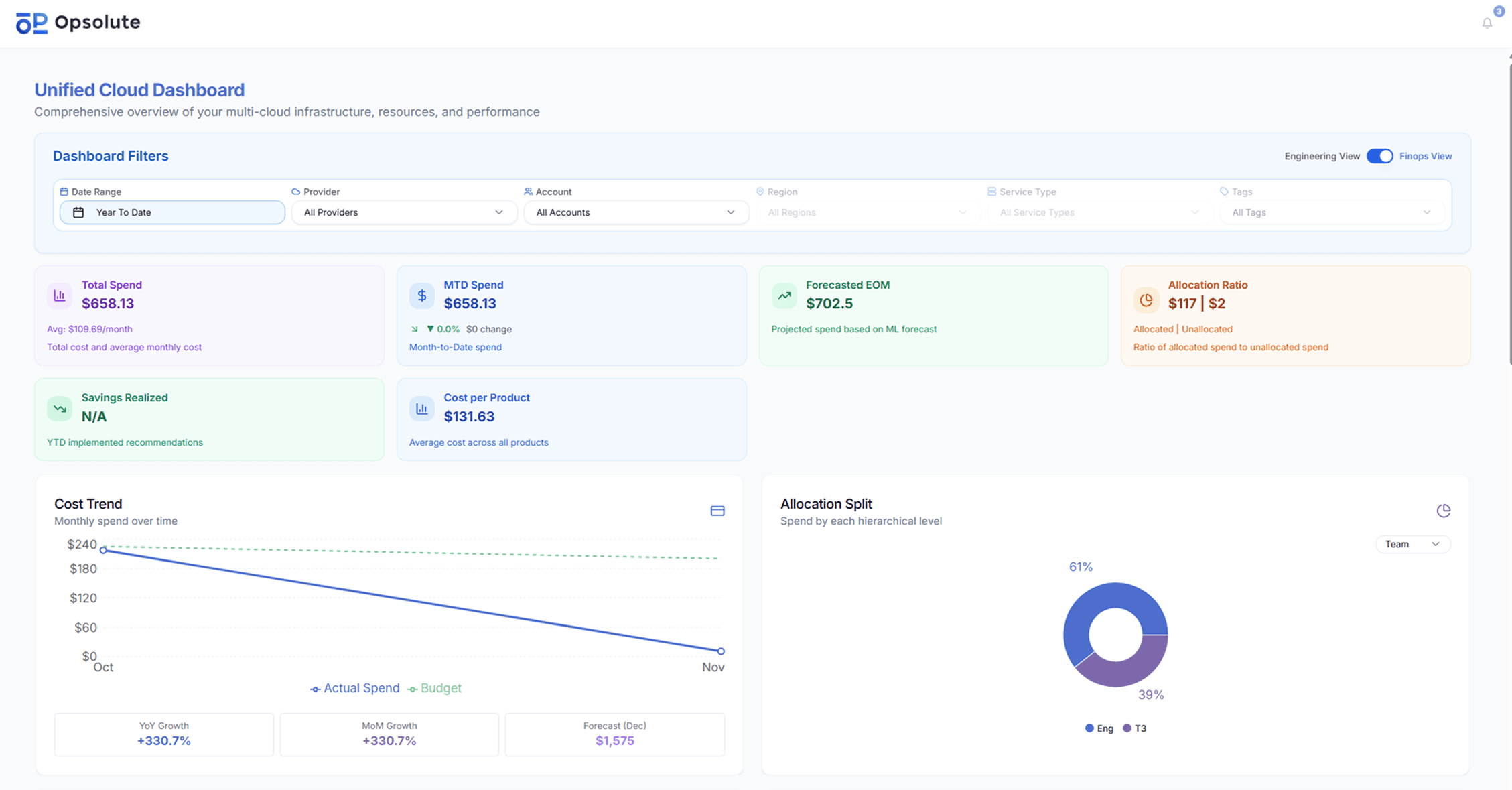
Opsolute delivers unified cloud cost intelligence across AWS, GCP with a focus on making cost optimization accessible from day one. Unlike tools requiring weeks of tagging prep, Opsolute's Tag Recommender and Tag Organizer provide semantic tag management that works with your existing chaos.
Key capabilities:
Unified Dashboard – Single view across all cloud providers with drill-down to service, team, and resource levels
Intelligent Showback – Hierarchical cost attribution that distributes spending across teams and departments automatically
Anomaly Detection – Real-time alerts catch billing spikes before they escalate
Resource Relationship Mapping - visualize resources with their dependencies and relationships
Budget-Aware Forecasting - Compare forecasted spend against budgets at every level
Infra Cost Estimator – Plan and forecast costs before deployment
Pre-Deployment Cost Intelligence - Engineers see cost implications and savings plan coverage before deployment.
What sets Opsolute apart: Start collecting intelligence within minutes with read-only API access. The platform learns your environment and begins recommending optimizations while competitors are still configuring integrations.
Best for: Mid-market to enterprise teams building FinOps practices who need unified visibility without months of implementation.
2. CloudZero
CloudZero pioneered the "cost intelligence" category by connecting cloud costs directly to business metrics. Rather than showing raw spending data, CloudZero answers questions like "What does this customer cost us?" or "Is this feature profitable?"
The platform ingests cost data from AWS, Azure, GCP, Oracle Cloud, plus platforms like Kubernetes, Datadog, Snowflake, and Databricks, aggregating everything into a single source of truth.
Key capabilities:
Unit Economics – Calculate Cost per Customer, Cost per Feature, Cost per Team, Cost per Environment
Engineering-Led Optimization – Developers see costs in their language (per service, per deployment)
Real-time Cost Allocation – Hourly reporting enables action before issues compound
100% Cost Allocation – Tag-free cost attribution using CloudZero's proprietary algorithms
Real-world impact: Drift saved $4 million in AWS spend. NinjaCat reduced cloud costs by 40%.
Best for: Product-led companies needing to understand unit economics and organizations where engineering drives cost decisions.
3. Finout
Finout tackles multi-cloud cost management with "virtual tagging" applying cost allocation rules without touching actual infrastructure tags. This matters when you inherit poorly-tagged environments or manage resources you can't directly tag.
The platform emphasizes FinOps workflows and team collaboration, making cost optimization a continuous practice rather than a monthly fire drill.
Key capabilities:
Virtual Tagging – Create cost allocation rules that work retroactively and across clouds
MegaBills – Unified billing view across AWS, Azure, GCP, Snowflake, Databricks, Kubernetes
Commitment Management – Automated RI and Savings Plan recommendations
Kubernetes Cost Allocation – Namespace, pod, and label-level visibility
Best for: Organizations with complex multi-cloud environments and poor tagging discipline who need flexible cost allocation without infrastructure changes.
4. Cloudability (Apptio)
Cloudability brings enterprise-grade governance and forecasting. Now part of Apptio's TBM (Technology Business Management) suite, it connects cloud costs to broader IT financial management.
Key capabilities:
Advanced Forecasting – ML-powered predictions based on historical trends and growth patterns
Chargeback/Showback – Sophisticated cost allocation for complex organizational structures
Multi-Cloud Support – AWS, Azure, GCP with consistent reporting across all three
Commitment Optimization – RI and Savings Plan recommendations with coverage tracking
Best for: Large enterprises with established FinOps teams needing integration with broader IT financial management.
Native Cloud Provider Tools
5. AWS Cost Explorer
Cost Explorer is AWS's free native cost management tool. It provides visibility into AWS spending with filtering by service, region, tag, and more. The tool includes basic rightsizing recommendations and Reserved Instance utilization tracking.
Key capabilities:
Cost Analysis – Visualize spending trends with customizable filters
Rightsizing Recommendations – Identify oversized EC2 instances
RI/Savings Plans Analysis – Track utilization and coverage
Forecasting – Predict spending based on historical data
Limitations: AWS-only, daily data refresh (not real-time), limited multi-account visibility, manual optimization required.
Best for: AWS-only organizations under $50K monthly spend or teams just starting cost optimization.
6. Azure Cost Management + Billing
Azure's native cost management tool provides similar functionality to AWS Cost Explorer but for Microsoft's cloud. It monitors Azure spending, analyzes costs, manages budgets, and provides optimization recommendations based on Azure best practices.
Key capabilities:
Cost Analysis – Break down spending by subscription, resource group, service
Budget Management – Set spending limits with automated alerts
Advisor Recommendations – Optimization suggestions based on usage patterns
Multi-Cloud – Can combine Azure and AWS billing data
Best for: Azure-first organizations or Microsoft-centric IT shops with limited cloud complexity.
7. Google Cloud Cost Management
GCP's native cost tools provide visibility and control over Google Cloud spending. The platform includes budgets, forecasts, and recommendations for committed use discounts.
Key capabilities:
Cost Breakdown – Analyze by project, service, SKU, or label
Budget Alerts – Set thresholds with email notifications
Committed Use Discounts – Recommendations for 1-year or 3-year commitments
BigQuery Integration – Export billing data for custom analysis
Best for: GCP-native organizations or data teams heavily invested in Google's ecosystem.
Kubernetes-Focused Solutions
8. Kubecost
Kubecost specializes in Kubernetes cost visibility and optimization. It provides pod, namespace, and label-level cost allocation, essential for understanding container spend in dynamic environments.
Key capabilities:
Pod-Level Costs – Attribute spending to specific workloads
Multi-Cluster Support – Unified view across multiple Kubernetes clusters
Idle Resource Detection – Identify wasted capacity
Rightsizing Recommendations – CPU and memory optimization suggestions
Best for: Organizations running significant Kubernetes workloads needing granular container cost visibility.
9. Cast.ai
Cast.ai combines Kubernetes cost optimization with automated cluster management. The platform continuously optimizes node types, implements spot instances, and scales clusters based on actual workload needs.
Key capabilities:
Automated Optimization – Hands-free cluster rightsizing and node selection
Spot Instance Orchestration – Intelligent spot instance management with fallback protection
Multi-Cloud K8s – Works across AWS EKS, Azure AKS, and Google GKE
60-Second Setup – Quick deployment with immediate optimization recommendations
Best for: Teams wanting automated Kubernetes optimization without constant manual tuning.
10. CloudPilot AI
CloudPilot AI applies machine learning to cloud cost optimization, with particular strength in spot instance management. The platform predicts interruptions 45 minutes in advance and automatically shifts workloads.
Key capabilities:
AI-Powered Spot Management – Predictive spot instance optimization
Quick Setup – Claims 60-second deployment to first insights
Automated Actions – Implements optimizations based on learned patterns
Multi-Cloud Support – AWS, Azure, GCP optimization
Best for: Organizations heavily using spot instances or wanting AI-driven automation.
Automation-First Tools
11. ProsperOps
ProsperOps automates commitment purchasing with a unique "autonomous" approach. The platform continuously buys and sells Reserved Instances and Savings Plans to maximize savings while maintaining flexibility.
Key capabilities:
Autonomous Management – No manual RI/SP purchasing required
Dynamic Optimization – Adjusts commitments as usage patterns change
Risk-Free Model – Pay only on savings achieved
Multi-Account Support – Works across complex AWS Organizations
Best for: AWS-heavy organizations wanting hands-off commitment management with guaranteed savings.
12. Spot.io (NetApp Spot)
Spot.io (acquired by NetApp) specializes in automated EC2 spot instance management. The platform provides guaranteed availability by predicting interruptions and automatically switching to on-demand or alternative spot instances.
Key capabilities:
Elasticity Engine – Automated scaling and instance type selection
Spot Instance Guarantee – SLA-backed availability for spot workloads
Ocean for Kubernetes – Container-optimized infrastructure management
Cost Analytics – Visibility into savings achieved through automation
Best for: Organizations running stateless workloads that can leverage spot instances with minimal management overhead.
5.Pricing Transparency: What These Tools Actually Cost
Here's what vendors rarely publish upfront.
Free Tier: Native Cloud Tools
Cost: $0
Limitation: Single cloud, basic features, manual optimization
SMB Solutions: $500-$5K/month
Typical pricing: 1-3% of cloud spend or flat subscription
Example: $2K/month for $100K cloud spend
Includes: Basic visibility, recommendations, budget alerts
Mid-Market Platforms: $5K-$20K/month
Typical pricing: 1-2% of spend with volume discounts
Example: $10K/month for $500K cloud spend
Includes: Multi-cloud support, anomaly detection, showback, API access
Enterprise Solutions: $20K-$100K+/month
Typical pricing: Negotiated rates, often <1% at scale
Example: $50K/month for $5M cloud spend
Includes: White-glove service, custom integrations, dedicated support
6.Implementation Complexity: From Setup to Value Realization
Marketing claims "setup in minutes" rarely match reality. Here's what actually happens.
Quick Setup (Hours to Days): Tools like Opsolute with read-only API access start collecting data immediately. Tag Recommender begins suggesting organization strategies within 24 hours.
Medium Setup (1-3 Weeks): Most comprehensive platforms need this timeframe. Week 1: API integration and data collection. Week 2: Tagging strategy implementation (this is where teams underestimate effort). Week 3: Team training and initial optimization actions.
Complex Setup (4-8 Weeks): Enterprise deployments with custom integrations, multi-team rollouts, and sophisticated showback models need significant time. Add two weeks if your tagging is a mess, and it usually is.
Time to First Value:
First insights: 12 - 24hours
First optimizations: 1-2 weeks
Meaningful ROI: 1-3 months
Full platform adoption: 3-6 months
Opsolute's advantage shows here. Tag Organizer provides semantic management for existing chaos. Service Topology Explorer visualizes Kubernetes costs without weeks of instrumentation. You're optimizing while competitors are still configuring.
7.Kubernetes Cost Optimization: The Underserved Niche
Kubernetes creates unique cost challenges. Dynamic scaling means resources appear and disappear continuously. Pod-level attribution requires understanding which microservice consumed what resources. Multi-tenant clusters make cost allocation nightmarishly complex.
Traditional tools see Kubernetes as a black box labeled "compute." Specialized platforms see inside: which namespace, deployment, and pod drove costs. They answer: "Did that new feature deployment increase cluster costs?" or "Which team's services are overprovisioned?"
Kubecost leads in visibility, pod-level costs, idle resource identification, and rightsizing recommendations specific to container workloads. Cast.ai adds automation, continuously optimizing node types and scaling policies. ScaleOps focuses on bin-packing efficiency, reducing cluster waste through intelligent pod scheduling.
Platform approaches like Opsolute's Service Topology Explorer visualize Kubernetes costs within broader multi-cloud context. This matters when Kubernetes is one part of a complex architecture including serverless, databases, and storage services.
8.Building Your FinOps Practice: Tool Selection Framework
Choose based on where you are, not where you want to be.
If you're reactive (discovering costs after they hit): Start with quick wins. Native tools plus one focused solution, anomaly detection or rightsizing. Goal: visibility and alerting.
If you're proactive (monthly cost reviews, some optimization): Invest in comprehensive platforms with showback capabilities. You need cost allocation, forecasting, and team accountability. Opsolute's FinOps Dashboard and Chargeback features fit here.
If you're optimized (continuous FinOps practice): Add specialized tools for specific challenges Kubernetes optimization, unit economics tracking. Integrate tools with existing workflows.
Decision Tree:
Multi-cloud or single provider? → Multi = platform, Single = native + specialized
Kubernetes-heavy workload? → Yes = K8s-focused tool essential
Team size and structure? → Large/distributed = need showback/chargeback
Budget for tools? → Limited = start free/cheap, prove ROI, expand
Opsolute's hierarchical attribution via Intelligent Showback works regardless of scale, startups get team-level visibility, enterprises get department-wise distribution with drill-down capability.
9.Getting Started: Your 30-60-90 Day Optimization Roadmap
Days 1-30: Foundation
Week 1: Audit current spending, identify top 3 cost drivers
Week 2: Demo 3-5 tools, run proof-of-concept with best fit
Week 3: Implement chosen tool, connect data sources
Week 4: First optimization actions, terminate obvious waste, right-size clear candidates
Quick wins: Shut down idle dev environments (typical 5-10% savings), implement storage lifecycle policies, convert on-demand to spot where safe.
Days 31-60: Systematization
Week 5-6: Deploy tagging strategy using Tag Recommender approach
Week 7: Set up budget guardrails and anomaly alerts
Week 8: First showback/chargeback reports to teams
This phase builds accountability. When teams see their costs, behavior changes fast.
Days 61-90: Optimization
Week 9-10: Analyze forecasting, adjust commitments (RIs/Savings Plans)
Week 11: Implement architectural optimizations from recommendations
Week 12: Review results, calculate ROI, plan next quarter
By day 90, you should see 15-25% cost reduction and have systematic processes replacing manual cost reviews.
Opsolute's Infra Cost Estimator helps plan before you build. Cost Optimization module prioritizes actions by impact, so you tackle high-value opportunities first rather than random optimization theater.
FAQ
Q: What's the difference between cloud cost management and cloud cost optimization tools?
A: Cost management tells you what you spent and where. Cost optimization tells you what to do about it. Management tools provide visibility, tracking, and reporting. Optimization tools add actionable recommendations, automation, and proactive waste prevention. Modern platforms like Opsolute combine both comprehensive visibility plus optimization opportunities with estimated savings.
Q: Do I need a third-party tool if I'm only using one cloud provider?
A: Even single-cloud organizations benefit significantly. AWS Cost Explorer lacks real-time anomaly detection, sophisticated showback, unit economics tracking, and advanced automation. Third-party tools also prepare you for inevitable multi-cloud adoption. Most companies think they'll stay single-cloud forever then engineering adopts a managed service only available elsewhere, and suddenly you're multi-cloud whether you planned it or not.
Q: How much can I realistically save with a cloud cost optimization tool?
A: Organizations typically see 20-40% cost reduction in year one. Quick wins (idle resources, obvious oversizing) deliver 10-15% savings within 90 days. Medium-term optimizations (commitment management, storage tiering) add another 10-20% over 6-12 months. Long-term architectural improvements provide ongoing efficiency gains. ROI usually arrives within 3-6 months for mid-market companies. One customer saved $28K monthly by rightsizing 500TB of log storage that paid for the tool's annual cost in three weeks.
Q: What's the typical implementation timeline for a cloud cost optimization platform?
A: Implementation varies wildly based on platform architecture. Read-only API tools (like Opsolute) start collecting data within hours. Comprehensive platforms need more time for full deployment: Week 1 for integration, 1-3 weeks for tagging strategy (the timeline killer), 1-2 weeks for training. Most platforms deliver first recommendations within the first week. The gap between "tool connected" and "team actually optimizing" is where timelines expand plan for this.
Q: Should I prioritize Kubernetes-specific tools or multi-cloud platforms?
A: If Kubernetes represents over 50% of your cloud spend and complexity, start K8s-focused. For multi-cloud environments where containers are one service among many, choose comprehensive platforms with strong K8s modules. Many organizations use both: a platform for overall FinOps and specialized tools for Kubernetes depth. The real question is: where's your biggest cost problem right now? Solve that first.
Q: Can cloud cost optimization tools help with FinOps team building?
A: Absolutely, they enable the three FinOps pillars. Inform through cost visibility and reporting. Optimize via recommendations and automation. Operate with guardrails and accountability mechanisms. Platforms like Opsolute with Intelligent Showback make cost responsibility distributed, engineers see their impact, managers get budget controls, executives get forecasts. Tools don't replace FinOps practitioners, but they multiply effectiveness dramatically. One person with the right platform accomplishes what previously required a team of three.
Ready to unify your cloud cost intelligence? Request an Opsolute demo to see how unified multi-cloud visibility, Tag Management, and Intelligent Showback eliminate tool sprawl while delivering actionable insights across AWS, Azure, and GCP.
Need to plan before you build? Use our Infra Cost Estimator for pre-deployment cost modeling and optimization recommendations.